March 31, 2026
Fix These 5 Tableau Dashboard Mistakes Today

These 5 Tableau dashboard mistakes can make your work look cluttered, confusing, and beginner-level fast. In this video, I break down the 5 biggest mistakes new Tableau users make and show you how to fix them so your dashboards look cleaner, more professional, and easier to use.
Download the practice workbook from this video here.
If you’re learning Tableau dashboard design, this video will help you avoid common problems like misusing colors, adding too many charts, ignoring your audience, overcomplicating layouts, and forgetting interactivity. These simple dashboard design tips will help you build cleaner, more actionable dashboards that feel less like data dumps and more like real business tools.
What we’ll cover:
- Misusing Colors, avoid the “Skittles Effect” and highlight what matters
- Chart Overload, use the Rule of 4 for cleaner dashboards
- Ignoring Your Audience, build for stakeholder decisions, not personal preference
- Container Chaos, why simple layouts beat overbuilt designs
- Functionality Fails, improve filter actions and remove distracting defaults
March 9, 2026
Highlight vs Filter Actions in Tableau: When Should You Use Each?

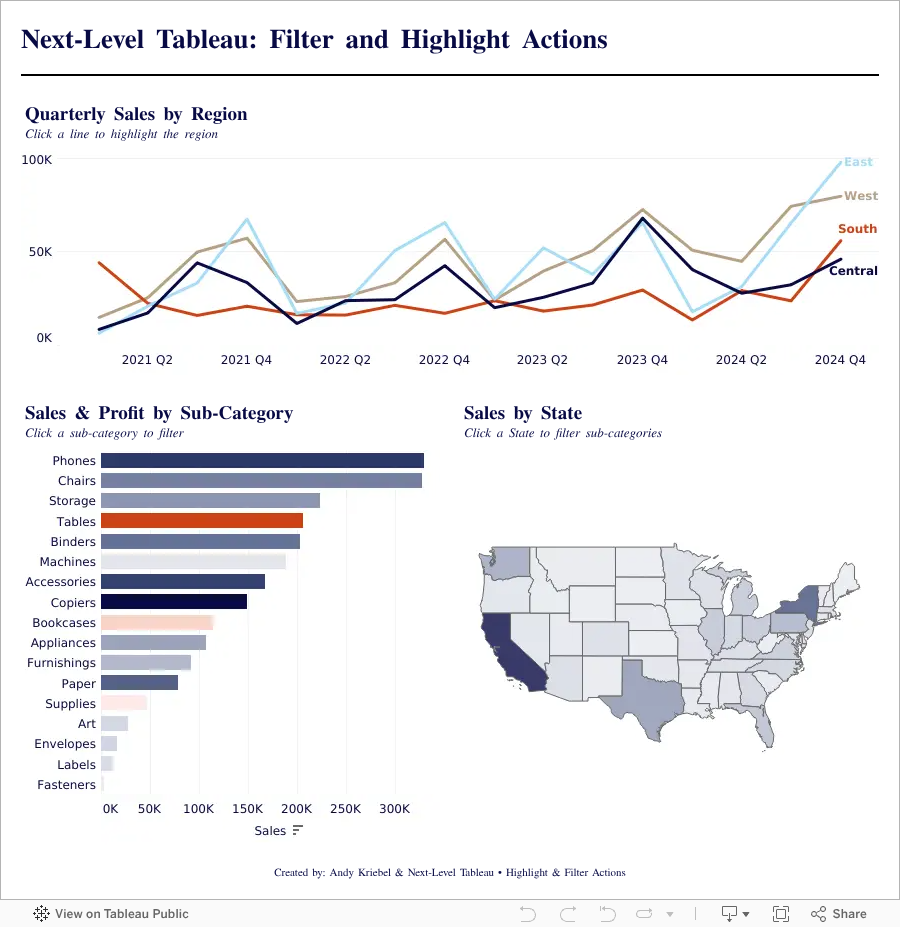
Highlight vs Filter Actions in Tableau can completely change how users interact with your dashboards. In this tutorial, you’ll learn the difference between highlight actions and filter actions, when to use each one, and how to build both into a Tableau dashboard from start to finish.
Using a practical end-to-end example, we’ll create charts, assemble them into a dashboard, and add interactive actions that improve usability and analysis. By the end, you’ll understand how highlight actions guide attention, how filter actions change the view, and how to use both together to create more effective Tableau dashboards.
Whether you’re new to Tableau dashboard actions or looking to sharpen your skills, this walkthrough will help you build more interactive and user-friendly dashboards with confidence.