Showing posts with label modulo. Show all posts
October 4, 2018
Workout Wednesday: Where are Sub-Category Sales Down?
alert
,
formatting
,
indicator
,
KPI
,
modulo
,
padding
,
table
,
table calc
,
Workout Wednesday
No comments
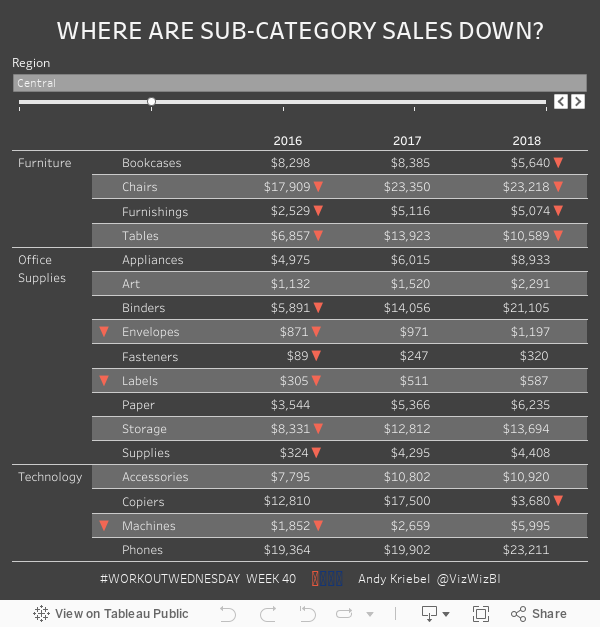
Three weeks in a row now! Feels like I'm on a roll. This week, Luke challenged use to create an actionable table which alerts users to the problem areas very quickly. This is a neat way to get people to begin the journey from Excel tables to interactive visualizations.
Read all of the requirements here.
Some thoughts:

Read all of the requirements here.
Some thoughts:
- I had used a lot of the tricks before, so I had an idea where to start. This video should be helpful for the indicators.
- I ended up using the modulo function along with an INDEX table calc to find the odd and even numbered rows so that I could format all of the text correctly.
- Getting the year to align correctly with the numbers was the toughest part. I could tell by looking at the viz that the text was centered, yet it was made to look like it was right-aligned. Therefore, I had to come up with a solution for padding the text on the left for smaller numbers. I won't give away how I did it.
Really good challenge. I particularly enjoy the workouts that have practical use cases for every day work. Thanks Luke for the challenge!
May 16, 2017
Tableau Tip Tuesday: Using the Modulo Function to Conditionally Format Numbers
conditional formatting
,
Jonathan Hayter
,
labels
,
mark labels
,
modulo
,
number format
,
Tableau Tip Tuesday
5 comments
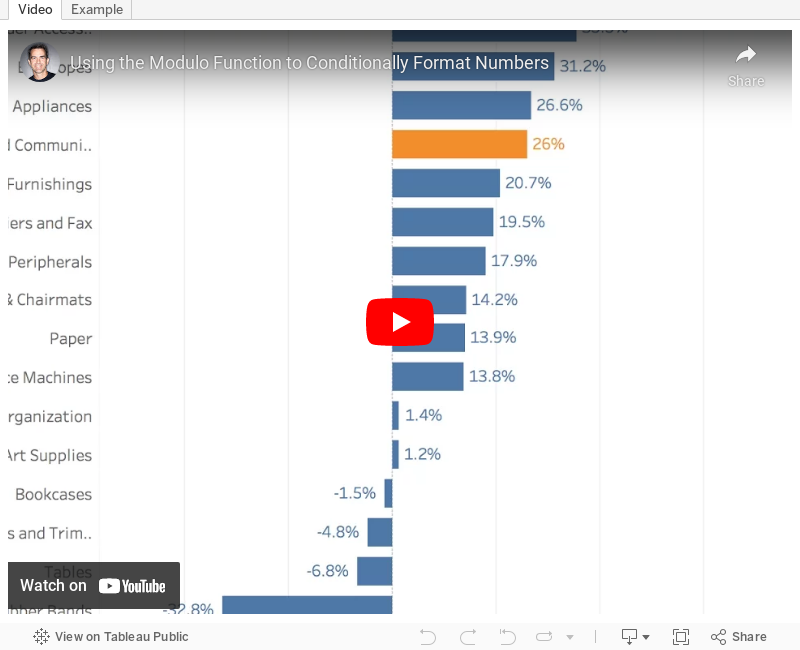
I want to show one decimal point on the value of my mark labels -- except when the digit following the decimal point is zero. So, in the example below, I'd like to make the label for 2013 show as "57%" rather than "57.0%."

Great question! I told Jonathan that I disagree with formatting the numbers differently, but I also wanted to help him find a solution. The answer is two calculations and the modulo function.
In the final version you see below I've included a third calculation to highlight the bars that a zero following the decimal point. This is merely to make it easier for you to see. I didn't show this in the video. Download the workbook to see the solution.
Enjoy!
Subscribe to:
Posts
(
Atom
)






