May 10, 2016
Tableau Tip Tuesday: How to Create Directional Lollipops

In this week’s tip, I show you how to create directional lollipops, an alternative view to time series jittering. In the video, I look at the incredible season by Stephen Curry and his shot results minute-by-minute, game-by-game.
Enjoy!
April 4, 2016
Makeover Monday: America's Most Diverse Cities Are Often The Most Segregated
 |
| Click on the image for an interactive version |
Diversity…always a hot topic in the States, particularly around election time. This week we for Makeover Monday, we look at this visualisation from FiveThirtyEight.

I chose those chart for two main reasons:
- It’s already good. How will everyone approach a chart that is already good vs. a one that has many flaws?
- I felt like there was more to the story than this chart reveals. The chart takes quite a while to comprehend, so surely there’s a better way to communicate the message.
Let’s start by consider what works well and what doesn’t. What works well?
- As with all FiveThirtyEight charts, it conforms to their principle of simplicity in design.
- The additional red trend line helps to clearly show what is above and below “normal”.
- Highlighting specific cities
- Additional descriptions through text aid in understanding
Ok, but when we look at those same reasons for being effective, we can also find some areas of weakness:
- Why are those particular cities highlighted? Some explanation is given, yet the design leads you to believe those are the most important cities.
- No information is provided for how the red trend line is drawn or calculated. Why not? Is the model not sound enough to promote sharing of it? It makes me skeptical.
- What does the location of a city on the scatterplot really mean? You have to read to complicated descriptions below the chart to gain that understanding.
- We have location information (i.e., cities), which immediately makes me wonder if there are geographic implications. HINT: there are!
I iterated through many different charts looking for a story. To me, the measure that is the most impactful in the Integration/Segregation Index. This is a measure of how far a city is from being fully integrated. The worse the number, the more segregated a city. This is the easiest metric to understand and the most telling. I created a slope graph and a bar chart that I threw away. In the end, I combined several views into a single dashboard.
- All of my charts use the integration/segregation metric for color
- I broke the chart into four quadrants and labeled each quadrant to aid in understanding.
- I included jitterplots of the city and neighborhood diversity indices to show concentrations.
- I included a map so that you can more easily see that cities east of the Mississippi River tend to be more segregated, which is emblamtic of the history of the United States. Eastern states have their roots in slavery, and it doesn’t appear all that much has changed from a segregation perspective.
- I included a filter so that the user can look at just the quadrant they are interested in.
I feel like my design gives the reader much more information about the problem, the story, and even a bit of historical context. While all of the data is the same in each chart, this is an example where including multiple displays of the same data in a single view can aid the understanding of the reader. When we’re creating data visualisations, it’s important to make them as simple to understand as possible. If you step away from your work and it’s not completely clear, then you should keep iterating.
You may also notice that I did something a bit different with the map. This is a Tableau map, yet you only see borders around the US states. I’ll create a video sometime for how I did that. If you’re curious in the meantime, download the workbook and see if you can reverse engineer my technique.
July 14, 2015
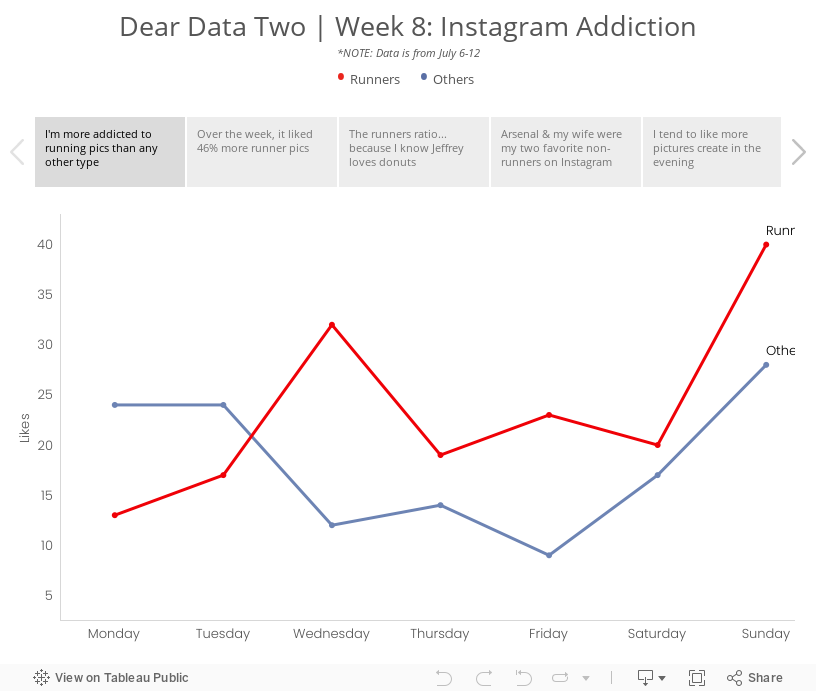
Dear Data Two | Week 8: Instagram Addiction

Week 8 was supposed to cover the period from May 25-31, but my data collection had a major fail. What I’ve done instead was use IFTTT to capture all pictures that I like on Instagram and log them to a Google Sheet. Note that IFTTT records the date that the picture was taken, not the date that I liked the photo, so the dataset reflects photo dates. Good enough for me!
I then exported the data from Google Sheets into Excel and did some date manipulation before importing the data into Tableau. Once I had the data in Tableau, I began to explore the data to see if any patterns emerged, focusing primarily on whether I liked running or non-running pictures the most. The story points below reflect my thought process. Enjoy!