August 6, 2025
Tableau Tutorial for Beginners (2025)

Want to learn Tableau fast?
Start with this beginner-friendly tutorial where I'll show you how to import data, clean it, build your first interactive dashboard, and share your dashboard—all using Tableau Desktop.
📚 RESOURCES• 📂 Sample Excel file to follow along (thanks Kevin Stratvert)
• 📊 Workbook 📺 RELATED VIDEOS
• Mastering Containers
• 370 FREE Tableau Tutorials 📩 NEWSLETTER
Each week, I'll send you Tableau tips, tutorials, and strategies to design better dashboards, have more impactful, and stand out in your career: https://nlt.kit.com/ 🔽 CONNECT WITH ME
• Official website
July 8, 2024
Build an interactive Tableau dashboard in 3 minutes!

Build 80% of your dashboards with these 4 charts, a bit of interactivity, and that's it.
You probably won't need to create anything fancy, formatting will be minimal, and you won't need to wrestle with containers.
This video show you how to create it in only 3 minutes!
March 11, 2024
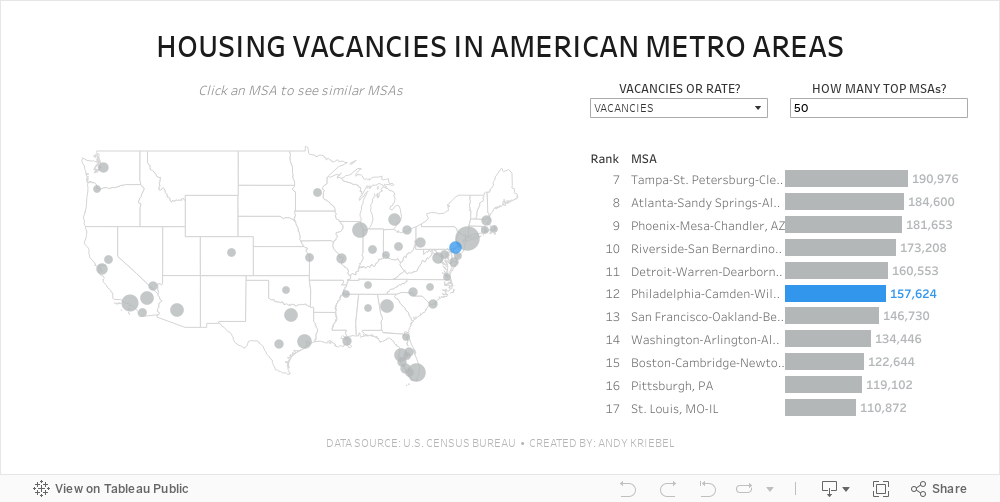
#MakeoverMonday 2024 Week 11 - Housing Vacancies in America

- Size - 1000x475
- Max 4 containers; no tiled containers allowed
- Filter out Alaska, Hawaii and Puerto Rico
- Clicking on a MSA in the map highlights the MSA in the map and bar chart and changes the MSAs that are displayed in the bar chart
- The bar chart shows the rank of the MSA for the metric selected.
- There should always be 11 bars (though I didn't test the lowest rank).
- The label on the end of the bar and in the map reflect the formatting of the measure selected (i.e., either whole numbers or a percentage to one decimaal).
- Include an option to change the measure and to change the number of MSAs on the map.
- Create a mobile view
- NO LODS!
October 24, 2023
Master Containers: Build an Interactive Tableau Dashboard From Scratch

September 19, 2023
Mastering 4-Level Map Drill Downs in Tableau

If you've enjoyed my previous tutorials on 2-level and 3-level drill downs in Tableau, prepare to take your skills to the next level.
I've got something unique for you: a step-by-step guide on creating a 4-Level Map Drill Down in Tableau!
What You'll Learn:
- How to drill down from a region to a state
- How to further drill down from a state to a county
- Finally, how to drill down from a county to a city
Prerequisites:
This is an advanced tutorial. Make sure you're comfortable with Tableau basics and have seen my 2-level and 3-level drill down videos.
Previous Videos:
2-Level Drill Down Tutorial
- https://www.vizwiz.com/2022/08/two-level-drill-down.html
- https://www.vizwiz.com/2023/06/map-drill-down.html
3-Level Drill Down Tutorial
- https://www.vizwiz.com/2023/08/dzv-drilldown.html
Links & Resources:
Workbook - https://public.tableau.com/app/profile/andy.kriebel/viz/4-LevelMapDrilldown/MapDrilldown
July 31, 2023
#MakeoverMonday 2023 Week 30 - Drinking Fountains in Milan

You'll learn about:
- Joining spatial data sources
- Parameters
- Hexbin maps
- Custom shapes
- Using mapbox maps
- Dashboard layout containers
- Dynamic Zone Visibility
- Parameter Actions
- Custom colors
- Drill down / drill up actions
Enjoy the video and check out the viz below.
June 14, 2023
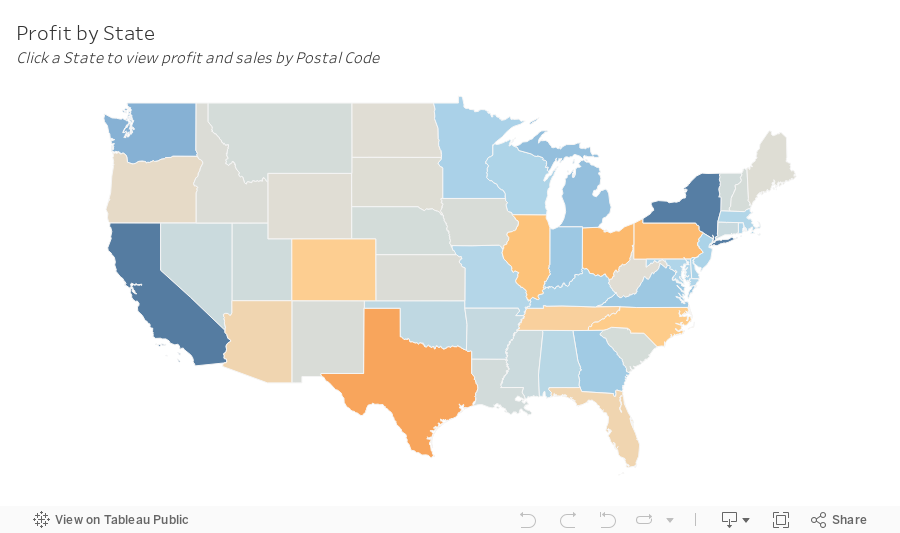
SIMPLE Map Drill Down in Tableau with Dynamic Zone Visibility

Creating a drill-down map in Tableau used to be more challenging than it needed to be.
But now, with the dynamic zone visibility, we can create a map drill down in just a couple of simple steps.
By signing up for my newsletter you get:
- Early access to tutorials
- New products
- Discounts
- Access to my new community Discord server
- Notification about any upcoming events and opportunities to learn
and more.
Sign up at andykriebel.com.
🆓 DOWNLOAD the data, plus a starter and completed workbooks:
https://andykriebel.gumroad.com/l/map-drill-down
🥁 See the viz in action:
June 6, 2023
Mastering TABLEAU Dashboards from Scratch

This comprehensive video will help you create business dashboards that are more actionable and meaningful and that your users will find easy to use at first glance. You’ll be on your way to being a dashboarding expert!
You’ll learn:
- Building basic charts
- Formatting fundamentals
- Using layout containers
- Dashboard formatting
- Essential tips for padding
- Filter controls
We'll create an interactive sales dashboard for Adidas in Tableau that's going to dynamically update based on the filters on the side of the dashboard which will allow us to select specific years, regions, products, and more.
⏬ DOWNLOAD my preferences file, the data, and starter and solution workbooks for £2 (this covers the costs of making this and future videos):
https://andykriebel.gumroad.com/l/adidassalesdashboard
Sign up for my newsletter to get advance, exclusive viewing of all of my videos, tips for using Tableau, plus exclusive discounts on products that I create.
https://andykriebel.com/
May 23, 2023
Make an Awesome TABLEAU Dashboard in Just 10 Minutes

In this video we'll build a dynamic Tableau dashboard from scratch in just 10 minutes. We'll create a sales dashboard for Superstore’s European region.
1️⃣ We’ll create all of the charts which include a map, bar chart, line chart, and KPIs.
2️⃣ We’ll customize the charts to fit our style.
3️⃣ We’ll place the charts on the dashboard using layout containers, padding, formatting and more.
4️⃣ We’ll add interactivity to the dashboard to make for a great user experience.
DOWNLOAD the data and starter and solution workbooks (this covers the costs of making this and future videos):
https://andykriebel.gumroad.com/l/10-minute-dashboard
I would appreciate your support, however, if you want the Excel file for free, download it here:
https://data.world/vizwiz/superstore-europe
Want early access to my upcoming videos like this one? Sign up for my newsletter. Every Friday morning, you'll get actionable tips to launch, grow, and unlock your career in data.
Sign up here.
January 30, 2023
#MakeoverMonday 2023 Week 5 - Where can you find a cheap slice of pizza in New York City?

- Prepare the data: calculations, joins, spatial intersections, and more
- Create maps: hexbin maps, map layers, spatial joins, using maps as shapes
- Create line charts and heat maps that are simple and effective (don't overcomplicate things)
- Build a dashboard using layout containers
January 9, 2023
#MakeoverMonday 2023 Week 2 - The Spartacus Gay Travel Index

I found the subject of this week's data set on the Instagram account of The Map Zone. It's a simple map of what's called the "Gay Travel Index".
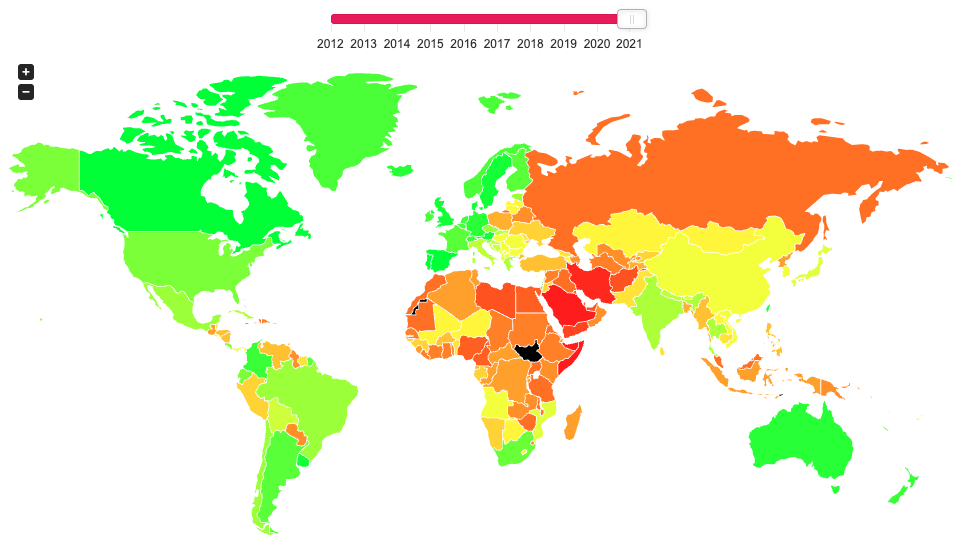
The annually updated SPARTACUS Gay Travel Index informs travellers about the situation of lesbians, gays, bisexuals and transgender (LGBT) in a total of 202 countries and regions. The US-Index provides information about each of the 50 federal states of the US.
The index attempts at finding a balance between measuring the rights of the local LGBT community and considering the demands of queer holidaymakers. Our aim is to monitor the safety of queer people in each country and also increase the awareness on grievances.
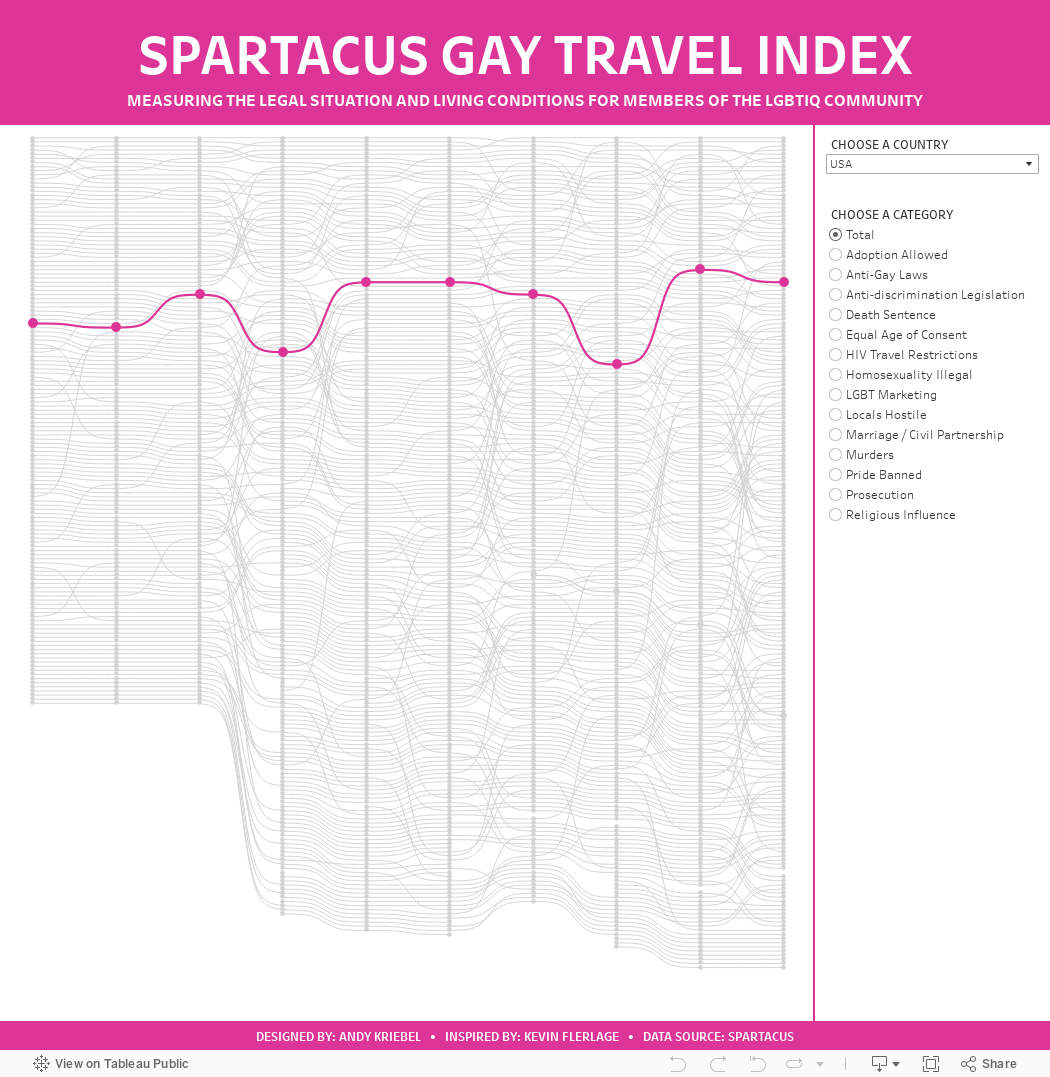
When I saw that the data was a ranking over time, I thought I'd give a curvy bump chart a try. I used this blog by Kevin Flerlage. He makes it super simple to follow along. During WatchMeViz, I showed how to use one of Kevin's visualizations from an old Makeover Monday as a template. I showed how to take the data we had for this week, transform it to the write shape needed for the template, then how to swap out the data source with the new one we created.
Honestly, when I swapped out the data sources, I was convinced that I would have messed things up along the way, but alas, I didn't and I was basically done. I spent time formatting, adding in more categories, and a bit more. Check out the viz below or here and follow along with Watch Me Viz to see how to build one yourself here.
November 22, 2022
#MakeoverMonday Week 47 - Worldwide Railroad Infrastructure Quality Rankings

- Recreating the original bar chart
- How to create a bump chart
- How to use a diverging color palette and alias country names
- How to create a ranked dot plot
- How to use parameter actions to sort the view
- How to use a filter action to remove the highlighting
November 1, 2022
#MakeoverMonday Week 44 - Fundraising vs. Spending by Members of the 117th Congress

The midterm elections in the US are next week. If you're able to vote, please do. Democracy is at stake.
This week's data was about fundraising, spending and debt by people currently in Congress. If you missed #WatchMeViz, I showed 16 different ways to visualize this data set. Hopefully they give you a bit of inspiration for creating your own.
Catch up with the show below. In the end, I went with a bar chart that compares funds raised vs. spent by State. I also have a gantt bar to show the difference between the two. I have a tutorial of that chart here.
Below this video is an image of the dashboard I created. Click on it to see the interactive version on Tableau Public.
September 27, 2022
Parameter Actions: Geographical Drill Down in Tableau
July 5, 2022
How to Create a Hexbin Map in Tableau
In this tip, I show you how to create a hexbin map in Tableau. But first, let me explain the purpose, benefits and drawback of a hexbin map.
There are countless times when I have been asked to display way too much data on a map. Sometimes I’ve been asked to display thousands of points on a map..but why? I know no one will understand it.
A hexbin map uses hexagons to divide an area into multiple parts and assign a color gradient to each hexagon. This chart type is used to visualize density, where the hexagons dividing the whole space into discrete units of equal size.
This video is going to help you communicate the concentration of data on maps more effectively and give you another option for visualizing geospatial data. I’ll show you how to create a hexbin map based on both the value and the rank, giving you two options depending on your use case.
If you want to follow along, these are the data sources I used:
1. Austin Bike Accidents - https://bit.ly/AustinBikeAccidents
2. Austin Zip Codes Shapefile - https://bit.ly/AustinZipCodes
3. Price Summary - https://bit.ly/PriceSummary
June 20, 2022
#WatchMeViz - Workout Wednesday 2022 Week 1

January 19, 2022
Social Connectedness in the United States

NOTE: The insights you see in this post are based on an article by The Upshot from September 2018. Some of the insights and use cases demonstrated are the same and are shown in Tableau for demonstration purposes.
----------------------------
When I first saw the map that The Upshot created in How Connected Is Your Community to Everywhere Else in America? I was blow away by the simplicity of the map and how easy it is to understand the relationships of people in the United States via their Facebook friendships. The first thing you need to understand is the metric "Social Connectedness Index". You can access the data I used via the same link.
Here's the formula Facebook uses to calculate the index:

From Facebook:
Social Connectednessi,j measures the relative probability of a Facebook friendship link between a given Facebook user in location i and a user in location j. Put differently, if this measure is twice as large, a Facebook user in i is about twice as likely to be connected with a given Facebook user in j.
In each dataset, we scale the measure to have a fixed maximum value (by dividing the original measure by the maximum and multiplying by 1,000,000,000) and the lowest possible value of 1. We also round the measure to the nearest integer.
I was not able to match the color scale in The Upshot exactly, so instead I used a table calculation that ranks each County in the U.S. compared to the County selected by the user.

Close enough for me!
The data has columns for the State/County of the user and for State/County of the friend. To ensure that I was only looking at friends for the County selected, I used Parameter Actions to filter the user to the County and State selected. The rank calculation then only uses the SCI for the friends.
Now let's look through some of the use cases as described in The Upshot.
DISTANCE IS MOST IMPORTANT

STATE LINES ARE BOUNDARIES

MIGRATION PATTERNS


PHYSICAL BOUNDARIES


August 4, 2021
#MakeoverMonday Week 31 - Bicycle Collisions in London

- Final Viz - https://bit.ly/mm2021w31
- London Shapefiles - https://data.london.gov.uk/dataset/statistical-gis-boundary-files-london
- Data set - https://data.world/makeovermonday/2021w31
- Original Visualization - https://bikedata.cyclestreets.net/collisions/
- Watch Me Viz - https://youtu.be/ZpuX4TLqBxQ
July 1, 2021
#WOW2021 Week 22 - Can You Structure the Unstructured?

May 4, 2021
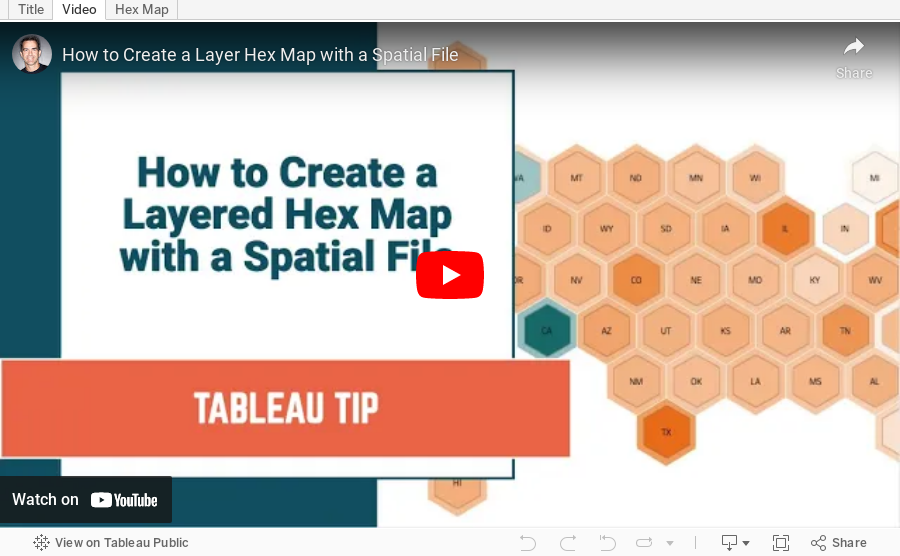
How to Create a Layered Hex Map with a Spatial File

In this tip, I show you how to use a spatial file to overlap hexagons on a map. This technique is much simpler, looks better, and is easier to maintain.
Typically when you want to create an overlapping hex map, you will use a template that has x/y coordinates for the rows and columns, hex shapes, then try to pack them together until they look just right. But then you put them into a dashboard and the sizes need to be adjusted again. What a pain!
Watch this tip to see the simple way to create layered hex maps.
RESOURCE: Hex map template via Joshua Milligan here