October 24, 2023
Master Containers: Build an Interactive Tableau Dashboard From Scratch

June 12, 2023
#MakeoverMonday 2023 Week 24 - Cereal and the Green Revolution: Yields vs. Land Use

At the global level, how has crop production changed over the last fifty years?
In this Watch Me Viz live stream, I analyzed how the yield and land use of producing cereal has changed over the last 50 years.
I really liked the original visualization, so I rebuilt it in Tableau. I learned how to use dynamic zone visibility, layout containers, and more. Check it out.
Resources:
1. Data - https://data.world/makeovermonday/2023w24
2. Final Dashboard - https://tabsoft.co/3P3Sdl3
===============
Watch Me Viz is a weekly live stream where I help people become better at #Tableau, #PowerBI and data analysis. I show how I take an existing visualization, critique it, analyze the data, and build several visualizations all the while looking for a "better" visualization than the original.
If you are considering participating in Makeover Monday, you can get started by downloading data sets from the Makeover Monday website. I promise you'll become better at data analysis and data visualization by practicing every week.
Data sets - https://www.makeovermonday.co.uk/data/
===============
LEARN FROM ME
Join my newsletter. Sign up at andykriebel.com.
ARE YOU INTERVIEWING FOR A NEW JOB?
Contact me for more information about how I can help you prepare for that big interview.
===============
CONNECT WITH ME
More Watch Me Viz - https://bit.ly/WatchMeViz2023
June 6, 2023
Mastering TABLEAU Dashboards from Scratch

This comprehensive video will help you create business dashboards that are more actionable and meaningful and that your users will find easy to use at first glance. You’ll be on your way to being a dashboarding expert!
You’ll learn:
- Building basic charts
- Formatting fundamentals
- Using layout containers
- Dashboard formatting
- Essential tips for padding
- Filter controls
We'll create an interactive sales dashboard for Adidas in Tableau that's going to dynamically update based on the filters on the side of the dashboard which will allow us to select specific years, regions, products, and more.
⏬ DOWNLOAD my preferences file, the data, and starter and solution workbooks for £2 (this covers the costs of making this and future videos):
https://andykriebel.gumroad.com/l/adidassalesdashboard
Sign up for my newsletter to get advance, exclusive viewing of all of my videos, tips for using Tableau, plus exclusive discounts on products that I create.
https://andykriebel.com/
May 23, 2023
Make an Awesome TABLEAU Dashboard in Just 10 Minutes

In this video we'll build a dynamic Tableau dashboard from scratch in just 10 minutes. We'll create a sales dashboard for Superstore’s European region.
1️⃣ We’ll create all of the charts which include a map, bar chart, line chart, and KPIs.
2️⃣ We’ll customize the charts to fit our style.
3️⃣ We’ll place the charts on the dashboard using layout containers, padding, formatting and more.
4️⃣ We’ll add interactivity to the dashboard to make for a great user experience.
DOWNLOAD the data and starter and solution workbooks (this covers the costs of making this and future videos):
https://andykriebel.gumroad.com/l/10-minute-dashboard
I would appreciate your support, however, if you want the Excel file for free, download it here:
https://data.world/vizwiz/superstore-europe
Want early access to my upcoming videos like this one? Sign up for my newsletter. Every Friday morning, you'll get actionable tips to launch, grow, and unlock your career in data.
Sign up here.
March 22, 2023
How to Master Containers in Tableau

If you use Tableau, you might be wondering how to organize your dashboards effectively. That's where containers come in handy. In this series of videos, I'll cover everything you need to know about using containers in Tableau.
→ I'll explain what containers are and why they're important.
→ I'll show you how to create and customize containers in Tableau, including how to adjust their size and position on the dashboard.
→ I'll demonstrate how to add worksheets to containers and how to control the layout of those worksheets within the container.
→ I'll also cover how to resize containers and how to align them with other objects on your dashboard.
Throughout these tutorials, I'll provide helpful tips and best practices for using containers effectively. I'll also answer common questions you might have about using containers in Tableau, such as how to use containers with filters.
By the end of these tutorials, you'll have a solid understanding of how to use containers in Tableau to organize and present your data effectively. Whether you're a beginner or an experienced Tableau user, this tutorial is sure to help you take your dashboards to the next level.
So, if you're ready to learn how to use containers in Tableau, watch these tutorial now!
March 1, 2023
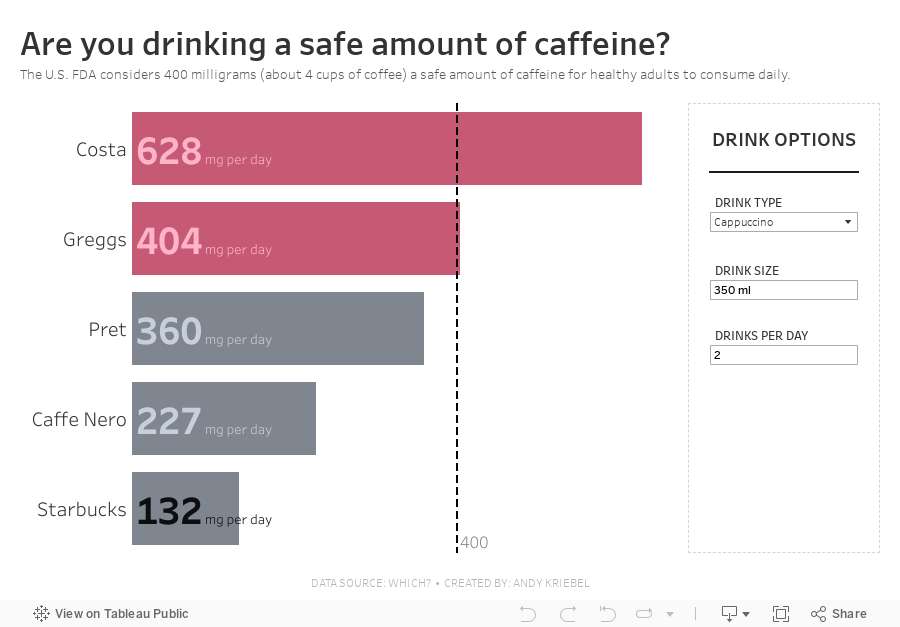
#MakeoverMonday 2023 Week 9 - Are you drinking a safe amount of caffeine?


February 20, 2023
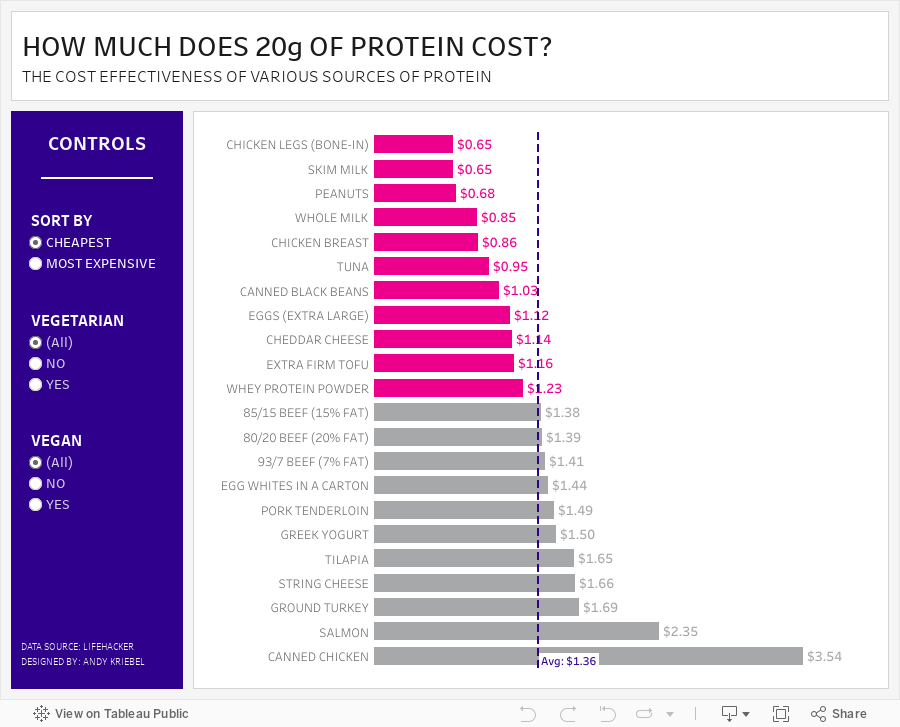
#MakeoverMonday 2023 Week 8 - The Cost Effectiveness of Protein Sources

This week we explored the cost of 20g of protein in various foods. During Watch Me Viz, I showed how to create toggles to allow the user to filter by vegan and vegetarian foods. I did this with parameter actions; if you want to learn more, watch the video below.
In the end, though, my fancy filtering with parameter actions didn't quite work out. I hadn't account for the option when the user might want to look at all foods. So I ended up using basic filtering. I overcooked the whole process, but I bet you'll learn something anyway.
I then went through the entire dashboard design process using containers, padding, shading and more. Check that out if you're interested in learning how to use layout contains.
Here's the #WatchMeViz recording, followed by the interactive viz. Enjoy and thanks for watching!
January 30, 2023
#MakeoverMonday 2023 Week 5 - Where can you find a cheap slice of pizza in New York City?

- Prepare the data: calculations, joins, spatial intersections, and more
- Create maps: hexbin maps, map layers, spatial joins, using maps as shapes
- Create line charts and heat maps that are simple and effective (don't overcomplicate things)
- Build a dashboard using layout containers
May 25, 2022
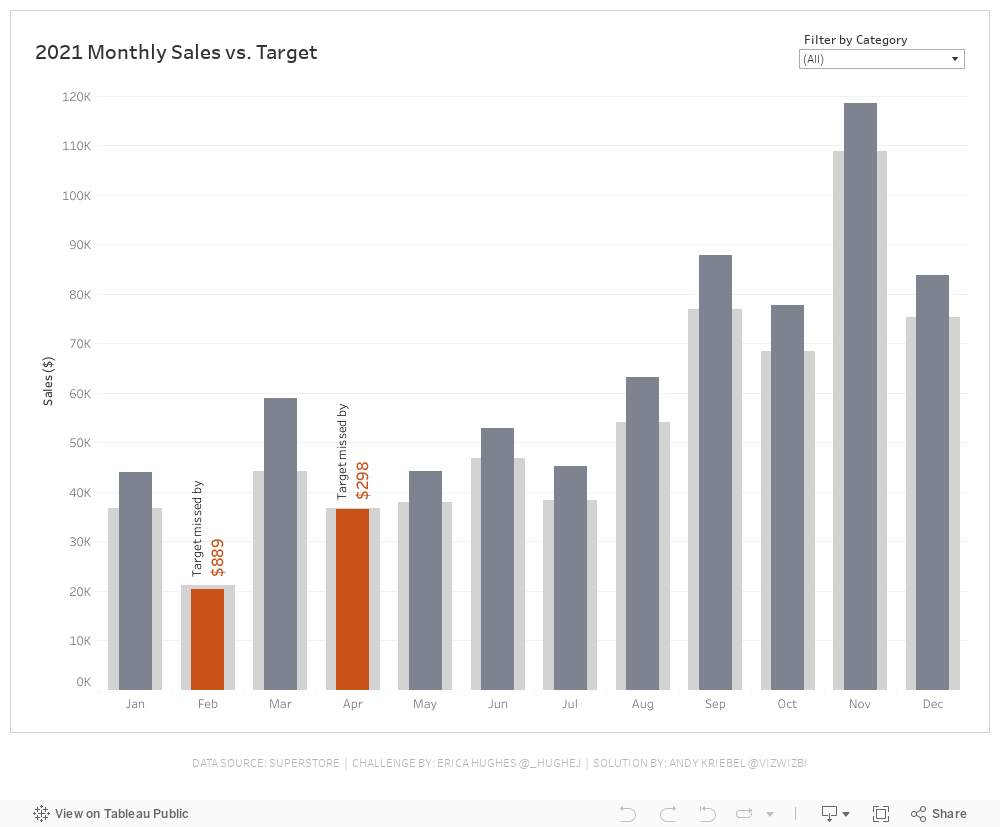
#WOW2022 Week 20 - Monthly Sales vs. Target
Resources
- Week 20 Challenge
- My Solution (image below)

March 31, 2022
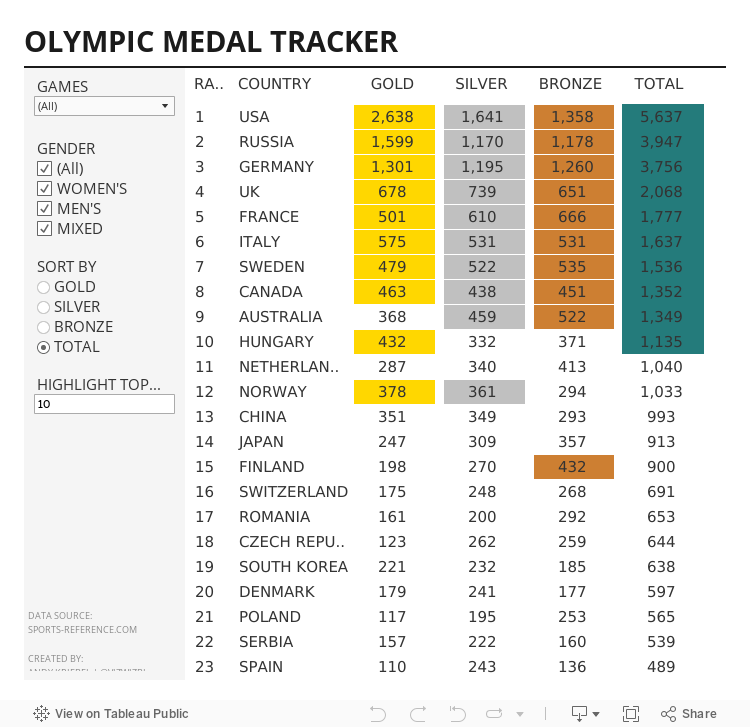
#B2VB 2022/W3 - Olympic Medal Tracker

If you're not participating in the Back to Viz Basics community project yet, you should be. It's all about creating effective, simple charts, which is exactly what you need to be able to do before you build anything fancy. This will definitely help you master data visualization best practices.
For week 3, the objective was to build a text table of Olympic medal counts. Sounds simple, but unfortunately, building good looking tables isn't one of Tableau's strengths.
I also started the #WatchMeViz livestreams again. You can find all of them on this playlist. Thank you to those that attended live and asked good questions and left thoughtful comments. Below is the livestream as well as my final viz.
Until next week...
August 19, 2021
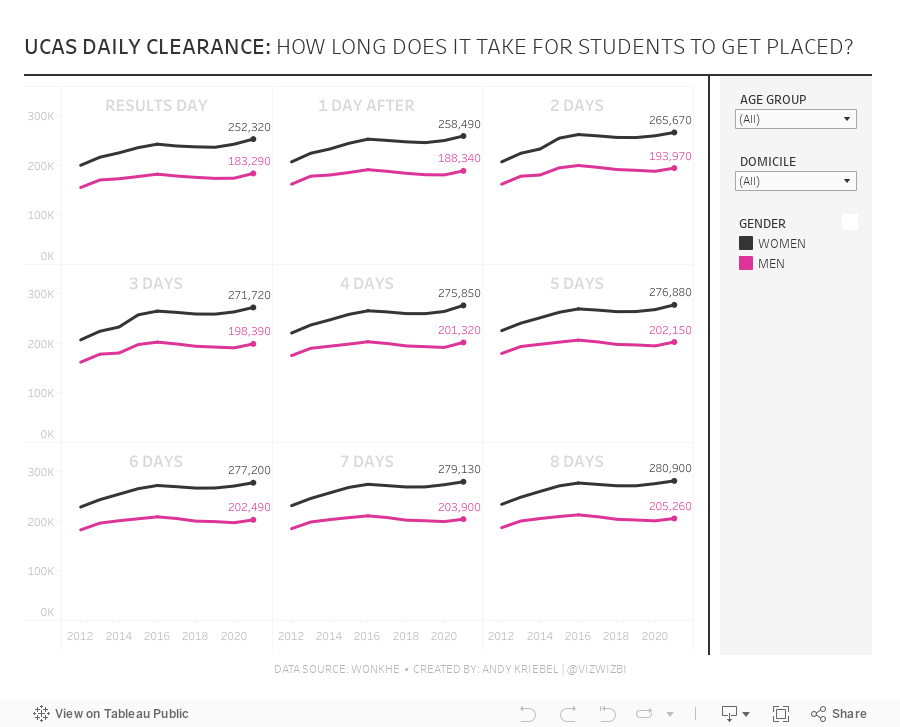
#MakeoverMonday 2021 Week 33 - UCAS Daily Placements

June 30, 2021
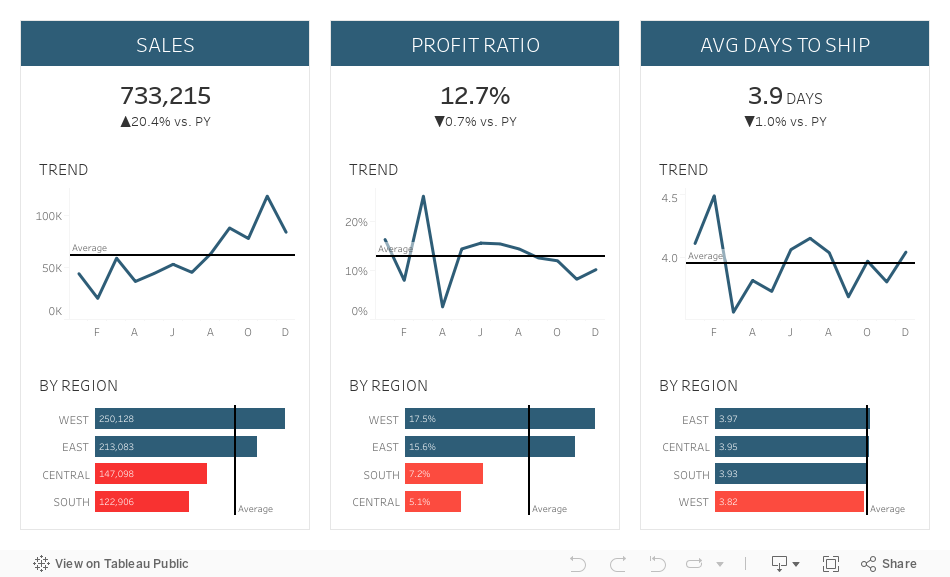
Sample KPI Dashboard
- Mastering Containers (Part 1)
- Mastering Containers (Part 2)

June 14, 2021
#MakeoverMonday 2021 Week 24: Which States Have the Highest Average Student Loans?
- Final workbook
- U.S. Hexmap Shapefile (credit: Joshua Milligan)

May 25, 2021
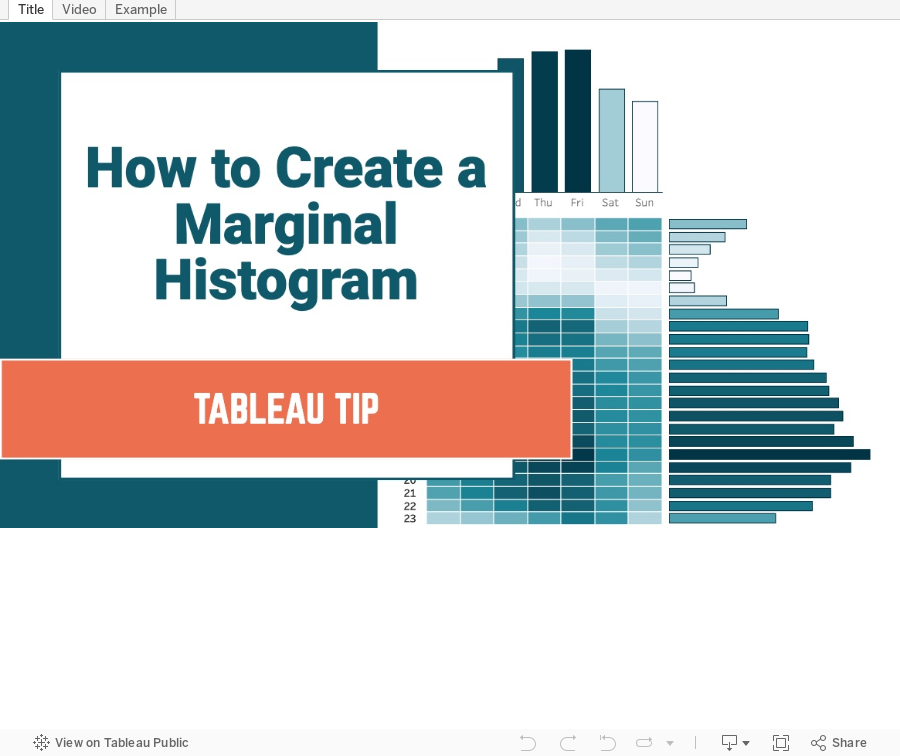
How to Create a Marginal Histogram

May 17, 2021
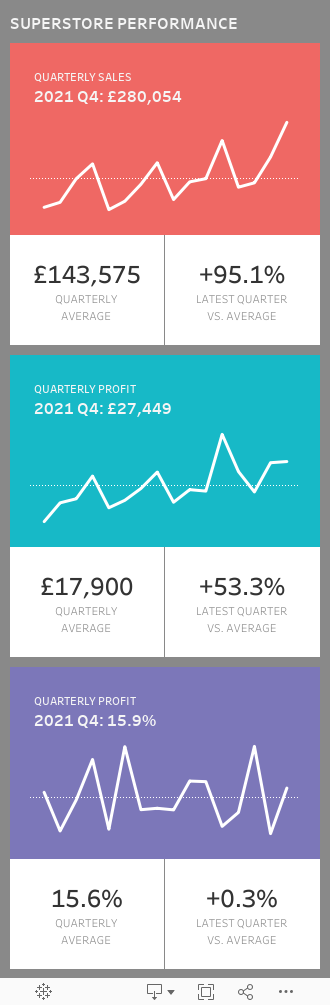
Designing for Mobile First - Sample Mobile Sales Dashboard

April 30, 2021
#WOW2021 Week 15 - Workout Wednesday Website Analytics
The requirements for week 15 are here. This is another super useful challenge as it helps you develop a dashboard you could easily use in your own organization.
My go-to blog post for working with and formatting time is this one from Jonathan Drummey. I'd say it's critical for solving this challenge. Also, think about the calcs for the reference lines and the BANs. As a hint, they're not just simple reference lines based on the measure on the rows. You WILL need to calculate the overall average separately.
Click on the image to interact with the dashboard and/or download the workbook here.

April 28, 2021
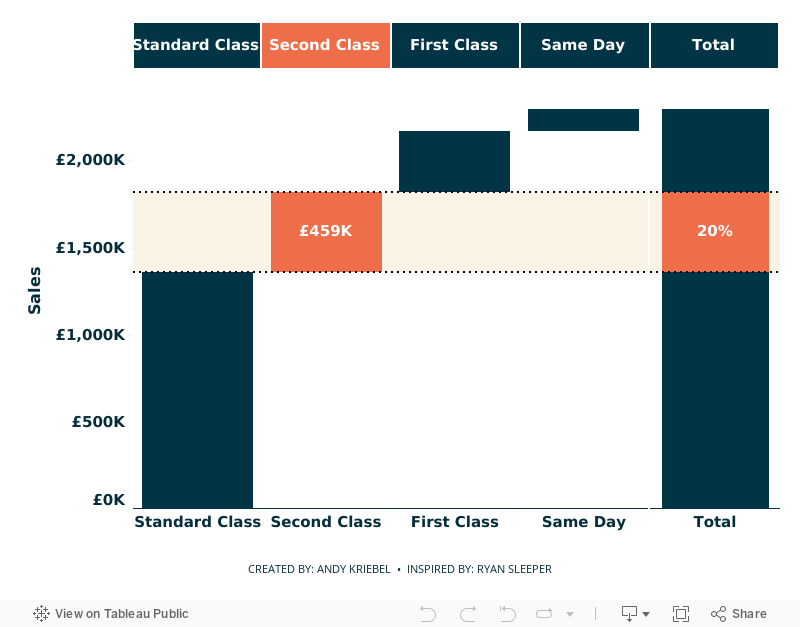
Using Parameter Actions to Highlight a Segment of a Waterfall Chart

- Parameter actions
- Table calculations
- Gantt chart to build the waterfall chart
- Highlighting
- Formatting
- Calculated reference bands
- Dashboard layout: containers, padding
April 19, 2021
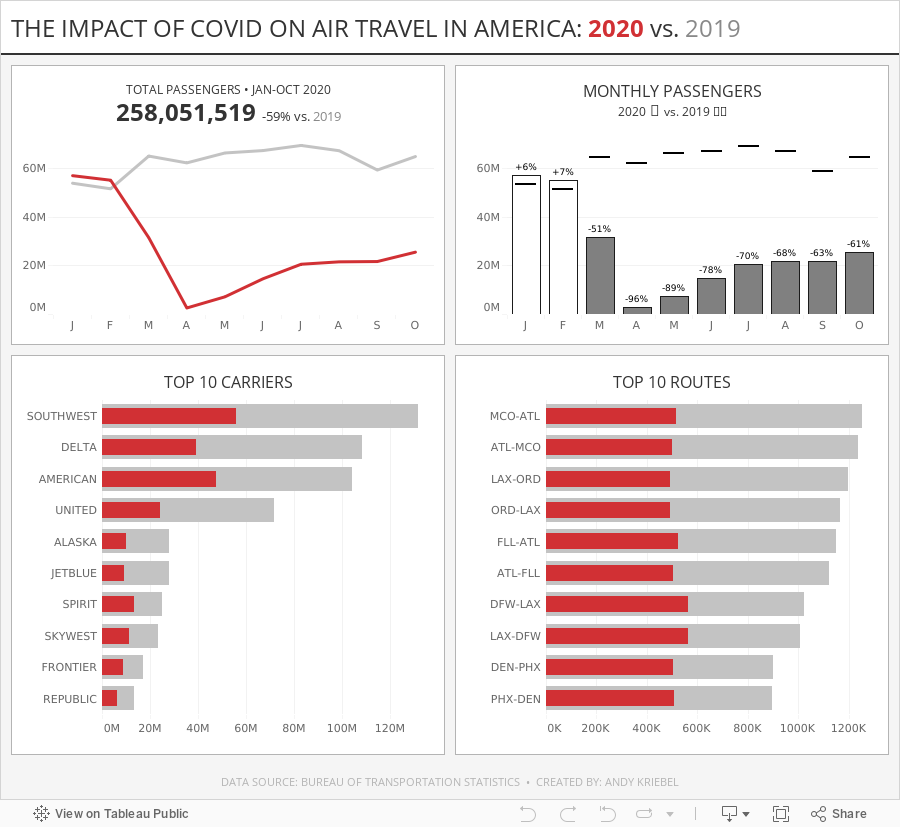
#MakeoverMonday Week 16 - The Impact of Covid on Air Travel in America
I struggled to come up with anything interesting this week, but that's ok. I was still able to explore the data a lot and ended up with a simple dashboard. Check out #WatchMeViz and interact with the viz below.

March 16, 2021
Mastering Containers in Tableau (Part 2) - Sales Performance Dashboard

March 15, 2021
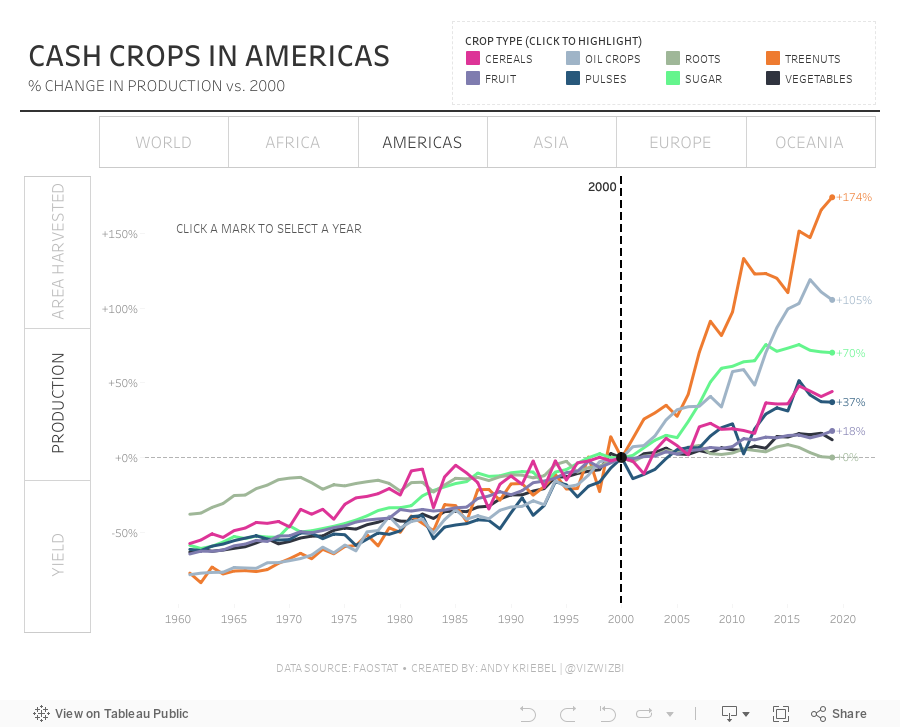
#MakeoverMonday Week 11: The World's Largest Cash Crops