April 19, 2021
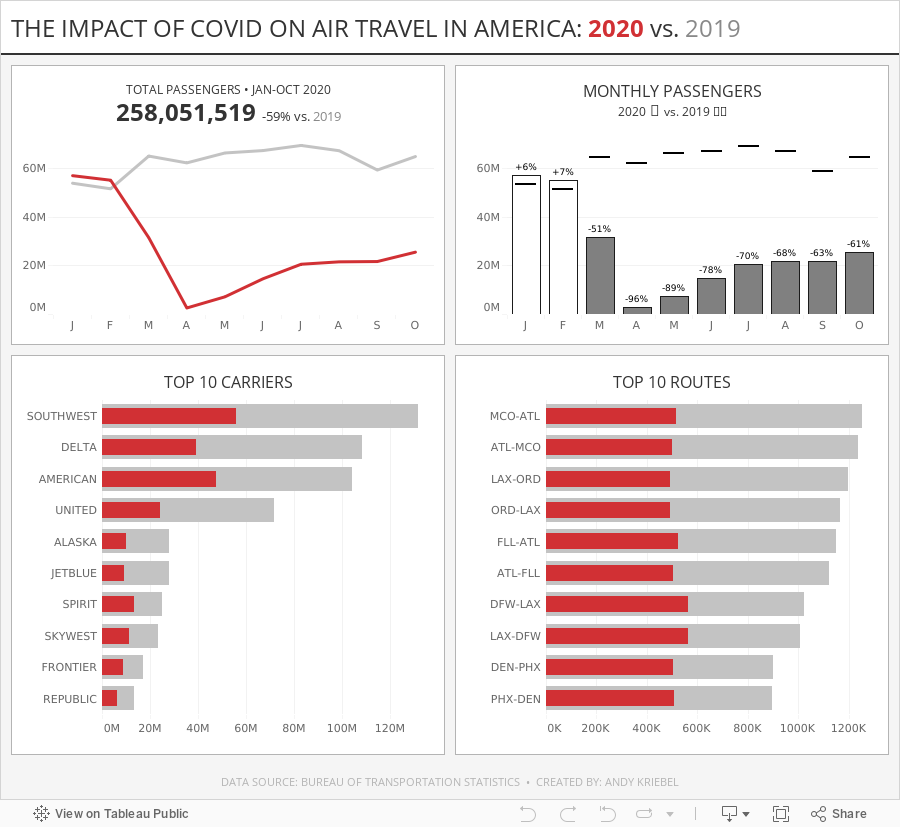
#MakeoverMonday Week 16 - The Impact of Covid on Air Travel in America
I struggled to come up with anything interesting this week, but that's ok. I was still able to explore the data a lot and ended up with a simple dashboard. Check out #WatchMeViz and interact with the viz below.

September 17, 2018
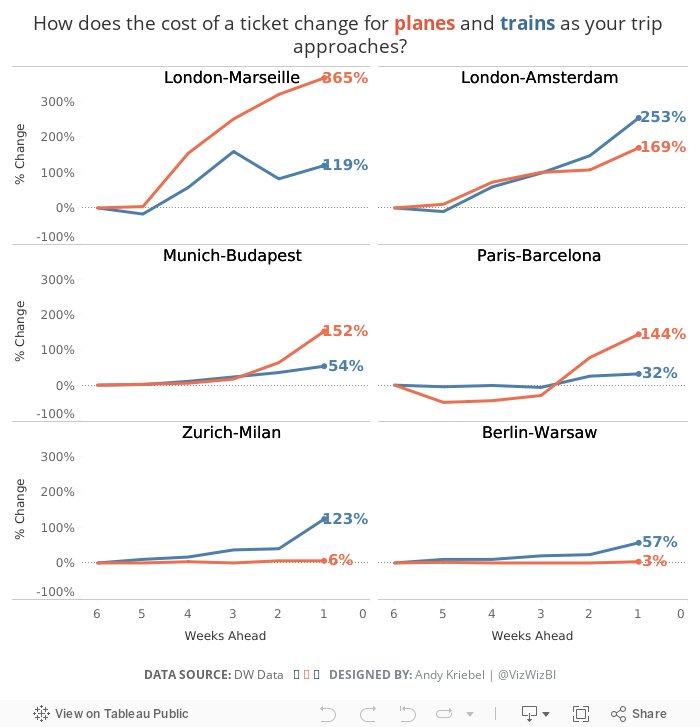
Makeover Monday: How does the cost of a ticket change as your trip approaches?


What works well?
- Simple title and subtitle that explain what the viz is about
- Line colors are easy to distinguish
- Good small multiples layout
- Reversing the time scale so that the larger number is to the last since it represents more days in the past
- Making the obvious
- Sorting the routes by distance
What could be improved?
- Reduce the font size for additional information like the footnote and the source
- Move the subtitle closer to the title and add space between the subtitle and the first chart
- Label the ends of the lines
What I did
February 6, 2017
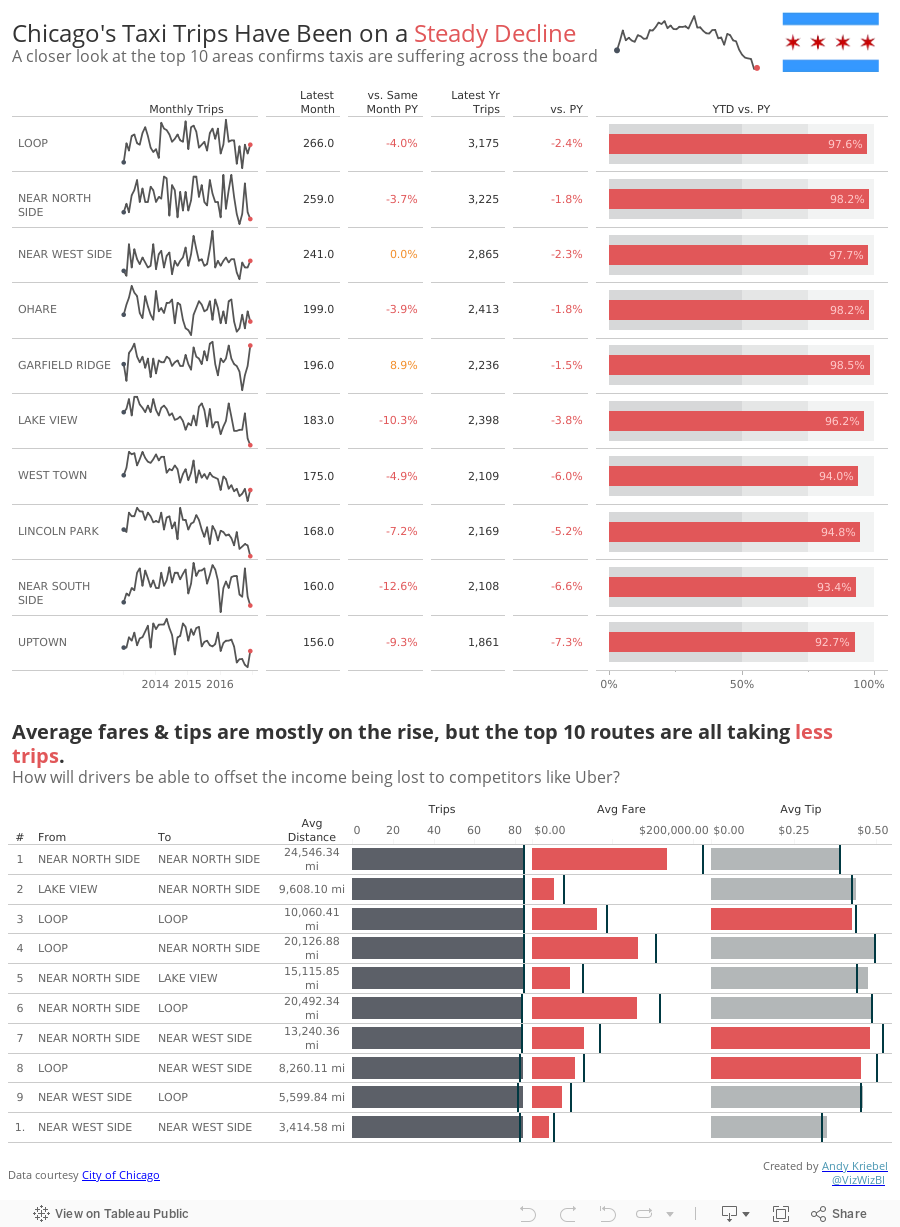
Makeover Monday: Are We Nearing the Death of Chicago Taxis?

What works well?
- Using a line chart to portray a time series rarely is a bad choice
- Nice simple labeling of the axes
- Title tells me what I'm looking at
- Red line on the grey background works well
- The y-axis is truncated, but the chart maintains a nice 3x2 ratio so that the line trends aren't too distorted.
- Scale of the y-axis is a bit odd; I like nice rounded numbers that make the math easy to do in my head
- There is SO much more data to work with; why limit to only trips?
- Could use a more impactful title
- Could use more context
Overall, another fun week. Tonight I get to introduce this to a bunch of new Tableau users at the #MakeoverMonday Live session at Tableau HQ in London. Can't wait to see what they come up with!
January 23, 2017
Makeover Monday: Domestic & International Tourism Spend in New Zealand
Already four weeks into another fun year of Makeover Monday. As it’s an even numbered week, it’s Eva’s week to pick the topic. I’m really enjoying her helping out with picking topics because it allows me to participate like everyone else. I don’t see anything ahead of time and have to read the article, interpret the data and build a viz all at once. When I pick the topics myself, I tend to think weeks ahead about what I want to create.
This week, Eva chose two charts that are basically the same. There’s one for international tourism spend and one for domestic. Here’s the international spend chart:

What works well?
- Title and subtitle make it easy to know what I’m viewing
- Source is clearly documented
- Colors are distinct enough that it’s clear we’re supposed to look at them individually
- Legend is out of the way
- Axes are clearly labeled
- Minimal gridlines that aren’t distracting
- Removing the vertical axis line
- Nice crisp font (Founders Grotesk)
What could be improved?
- Packed bars make it harder than necessary to follow a year across its months
- 100 is the baseline (see the subtitle), so why isn’t the chart the difference from the baseline?
- Overall too cluttered
- Are there more years that could be used for comparison?
- What was spending like before 2008? How do 2013-15 compare?
- Are we trying to understand the change within each month or the change across the years?
I must admit that I got sucked in by all of the detail Eva provided in the data set. I started by creating a view of the change in spending by year compared to the 2008 average. After all, this is the baseline, so we should be comparing to that. Anything above 100 is an increase compared to 2008; anything below 100 is a decline versus 2008. I wonder how many people are going to catch that subtlety in the data. I understood it after reading the notes that accompanied the chart.
This is what I came up with first. It show the change versus 2008 for each region. Click on the image for the interactive version.
But was I really doing a makeover of the original? No, I wasn’t. The original was look at the country total, so back to the drawing board I went. I really liked the look of the lines I had created so it wasn’t like I was completely starting over. What I wanted to show was:
- How did the overall spending change compared to 2008 for each visitor type?
- What was the change by year within each season? This would help me understand any seasons where tourism spending has decreased.
Overall, a really fun data set to play with and a lesson learned to not get sucked into the data too quickly. I need to think more holistically, think about the story I want to tell, search for idea, do some sketching, and move away from Tableau when I start. Basically, practice what I preach.
November 21, 2016
Makeover Monday: Wildlife Strikes in the USA

Let's start with Kelly Martin's incredible airplane/wildlife collisions dashboard:

What works well?
- To put it simple, everything works well here. Kelly has a very intentional design style.
- Minimal use of color
- Great use of whitespace
- Excellent annotations
- Great use of icons
- Nice instructions
- Good interactivity
- Remove the size legend and indicate that through text
As for the advanced logging, Tableau Research asked this week that we enable a setting on Tableau that creates an image every time you do something on a worksheet. I had no idea what this would result in, but in exactly 60 minutes, I created 396 images. That's a lot of squiggles! Here's a gif of my iterations:

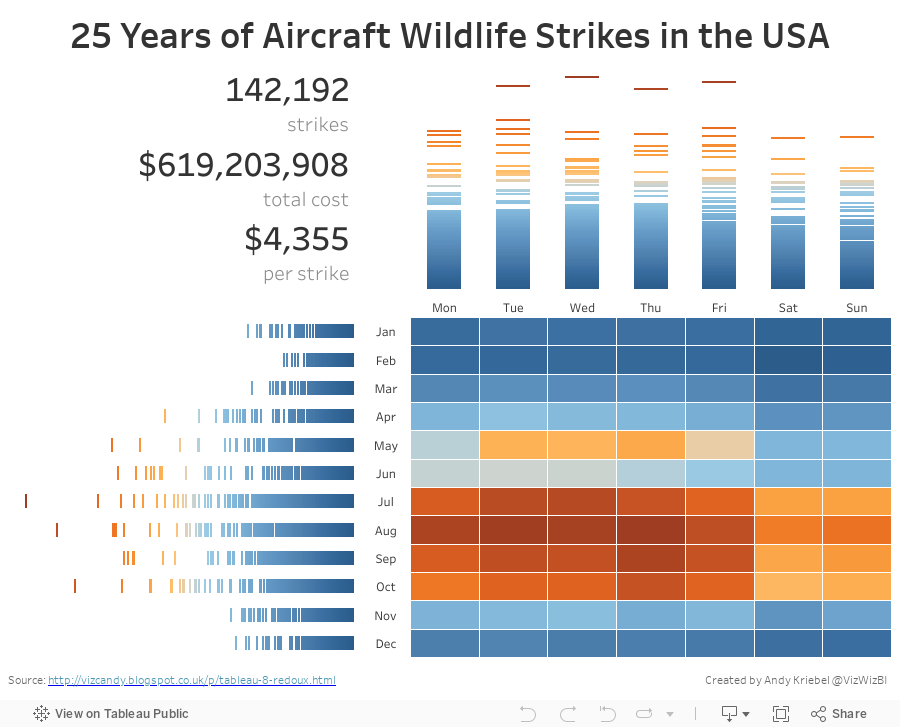
For my makeover, I wanted to implement a visualisation technique I learned from Tableau's Michele Tessari at #Data16 in his session "Artful Data: The Balance of Art and Analysis". My goal was to show the number of strikes by weekday and month, but also to show the values for each state.
Another fun week of playing with data. Here's my take on this data set:
January 31, 2016
Makeover Monday: Travel Agents Are a Relic of the Past and Hotels Could Be Next

The chart that we're reviewing this week for Makeover Monday is from Tech Chart of the Day. The title of the article "Travel Agents Are a Relic of the Past and Hotels Could Be Next" is quite catching, but the accompanying chart leaves a lot to be desired.

What can be improved?
- The title is boring and doesn't capture my attention.
- I'm not exactly sure which axis goes with which colour because neither axis is labeled.
- The colours of the lines are too similar for me.
- For some reason, my eyes want to match the darker blue line with online hotel revenue and the lighter blue line with # of travel agents, but they're actually the opposite.
- A dual-axis chart is often used to show a correlation, but is the correlation explained by this chart.


A combination chart like this makes our eyes separate the two metrics while still allowing us to see the patterns of both at the same time. For example, it's easy to see that online hotel revenue is steadily increasing and the number of travel agents is decreasing.
However, the story here is the growth of revenue for online hotel services like Airbnb, VRBO, Flipkey, and HomeAway compared to the decline of travel agents. So, with that in consideration, I wanted to see how the respective growth (or decline) rates since 2000.

In this view, notice how I've significantly changed the title to meet the objectives of the story and how I've changed the axis titles. This view clearly shows the significant increase in online hotel revenue since 2000 and the fairly significant decrease in travel agents. Yet I still don't love it.
I'm thinking a connected scatterplot might do the trick. As Ben Jones said:
The connected scatterplot imparts a sense of travelling a pathway through a terrain that has twists and turns, loops and sudden rises and falls that encode how the two different variables changed together.That's exactly what I'm looking for; a method for showing how the two variables move together. So taking the % change since 2000 from above and converting it into a connected scatterplot, I get this:

I really like how this shows how the decrease in travel agents and the increase in online hotel revenue shifts together. I also added annotations to drive the point home even farther. Yet I still feel like this isn't quite done. I like the annotations, but not the axis scales. While the % change gives me nice context, I feel like I'm losing the overall magnitude of the changes.
Lastly, I removed the % change over time from each axis and went back to the raw values. I then made the line dashed because I feel like the dashed lines show the trails through time better.
In particular, I like how the design of this connected scatterplot starts at the upper left and moves down and to the right. I used Cole Nussbaumer's "where are your eyes drawn" test by turning my head away then back and seeing where my eyes go first. They went directly to the upper left dot for the year 2000, just like I had hoped.
You can download this workbook from my Tableau Public profile here.
January 6, 2016
Fade to Ginger: Who Says Man Can't Time Travel?

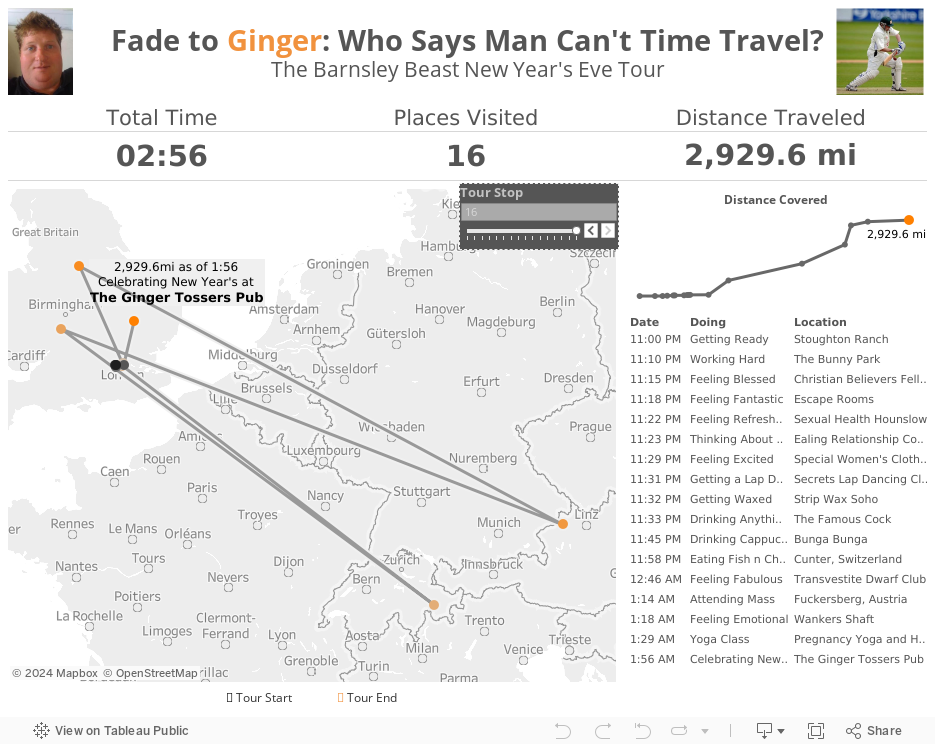
Well, as I was spending New Year's Eve with my family, I noticed my buddy Luke Stoughton checking-in on Facebook all over the place...and quickly! From 11-11:30pm, he had checked-in to 6 places all over London and covered 28 miles. By midnight, he had already been to Switzerland! By 1:15am, he had come back to England and gone on to Austria. And then back to England again only 14 minutes later!
Either Luke is some sort of superhero (he does have the power to make a deer limp after all) or his buddies were pranking him. Either way, he granted me permission to visualise his amazing night. Click through the Tour Stops to see everywhere Luke visited on his epic New Year's Eve.
September 3, 2015
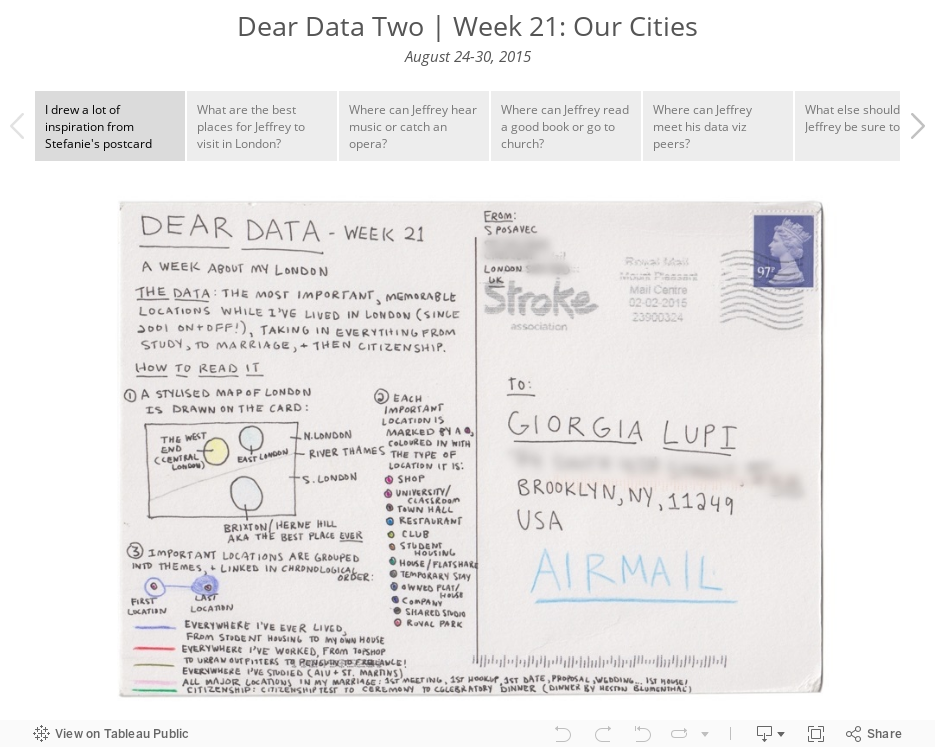
Dear Data Two | Week 21: Our Cities

August 29, 2014
Two-way Sorting in Tableau - Sorting Some of the Viz by a Measure and the Rest Alphabetically
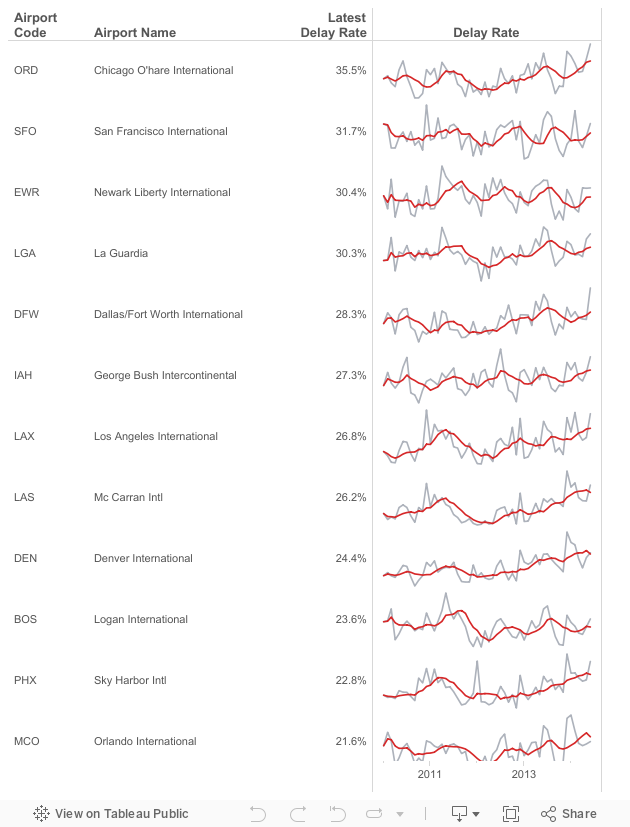
- Given a list of airports, there are a subset that are "targets". Let's assume they are the top 15 with the most flights in 2014: ATL, DFW, ORD, LAX, DEN, IAH, SFO, PHX, LAS, MCO, CLT, EWR, BOS, SLC, LGA
- The airports need to be sorted by the latest delay rate. However, only those in my top 15 list should be sorted by delay rate, the rest should be sorted alphabetically to make them easier to lookup.
- Include sparklines for each airport for 2010 to present.