May 25, 2026
The Big Beautiful Bar Chart: Build It in Tableau with Map Layers

May 15, 2024
#MakeoverMonday 2024 Week 20 - Exporting Freedom, One Bullet at a Time

I struggled mightily with this week's #MakeoverMonday. My goals was to replicate the original visualization by Bloomberg.
I knew I need to create path to connect the US at the center to each country.
I wanted to make the US the center of the of the map.
Sounds simple, right? I made it way harder than it needed to be.- I overthought the data prep.
- I forgot how to create the paths.
- I couldn't get the math right to offset the longitude.
The coloring and labeling was straightforward for me.
Adding the US as a circle in the middle was pretty simple.
To overcome the problems I facedI looked at a previous visualization I created using paths.
- I opened the workbook and the data to see the configuration.
- I replicated that set up by adding a second set of records to the data set.
- Viewers on the livestream helped me figure out the math to offset the longitude.
The simplest way to explain the location of each country is to think of the lat/lon for the US as 0,0. Then you compare that to the lat/lon for every other country to create the offset.
I got there in the end. What do you think? Was the juice worth the squeeze?
Click the image below to access the viz.
April 1, 2024
#WatchMeViz: Can viral infections be cured with antibiotics?

March 11, 2024
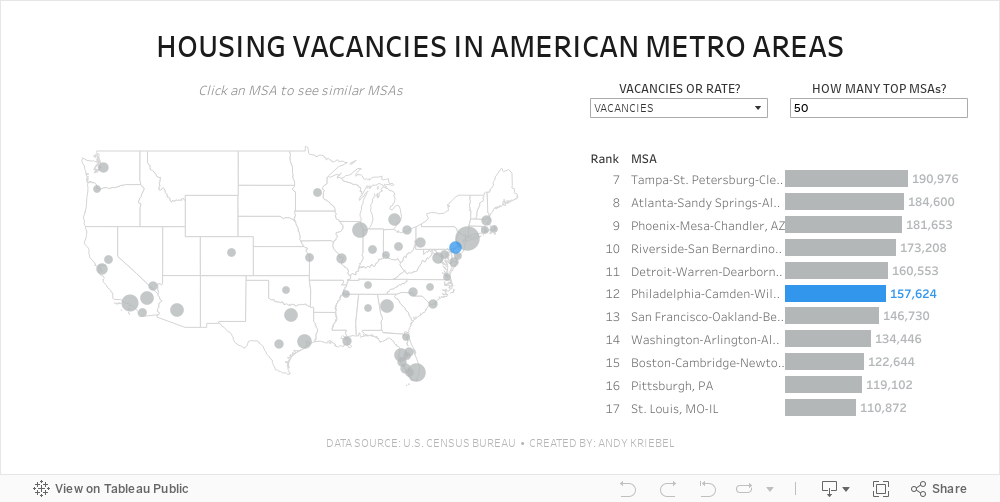
#MakeoverMonday 2024 Week 11 - Housing Vacancies in America

- Size - 1000x475
- Max 4 containers; no tiled containers allowed
- Filter out Alaska, Hawaii and Puerto Rico
- Clicking on a MSA in the map highlights the MSA in the map and bar chart and changes the MSAs that are displayed in the bar chart
- The bar chart shows the rank of the MSA for the metric selected.
- There should always be 11 bars (though I didn't test the lowest rank).
- The label on the end of the bar and in the map reflect the formatting of the measure selected (i.e., either whole numbers or a percentage to one decimaal).
- Include an option to change the measure and to change the number of MSAs on the map.
- Create a mobile view
- NO LODS!
October 17, 2023
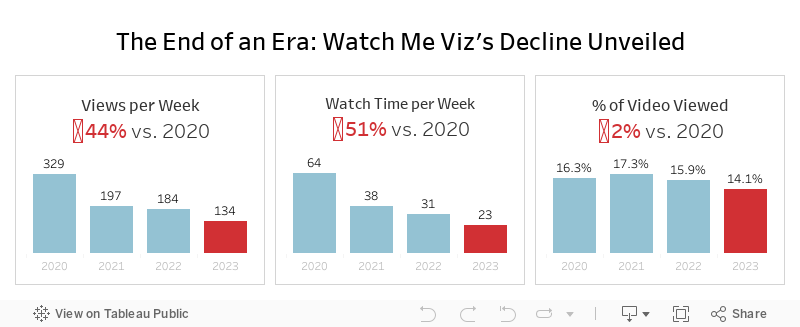
The End of an Era: Watch Me Viz's Decline Unveiled

That's a wrap. Watch Me Viz has retired, for good.
This week's data was about the performance of all of the WMV livestreams. There was some incredible viewer participation, which ultimately led to this viz that explains why WMV should quietly disappear.
Check out the livestream below.
October 9, 2023
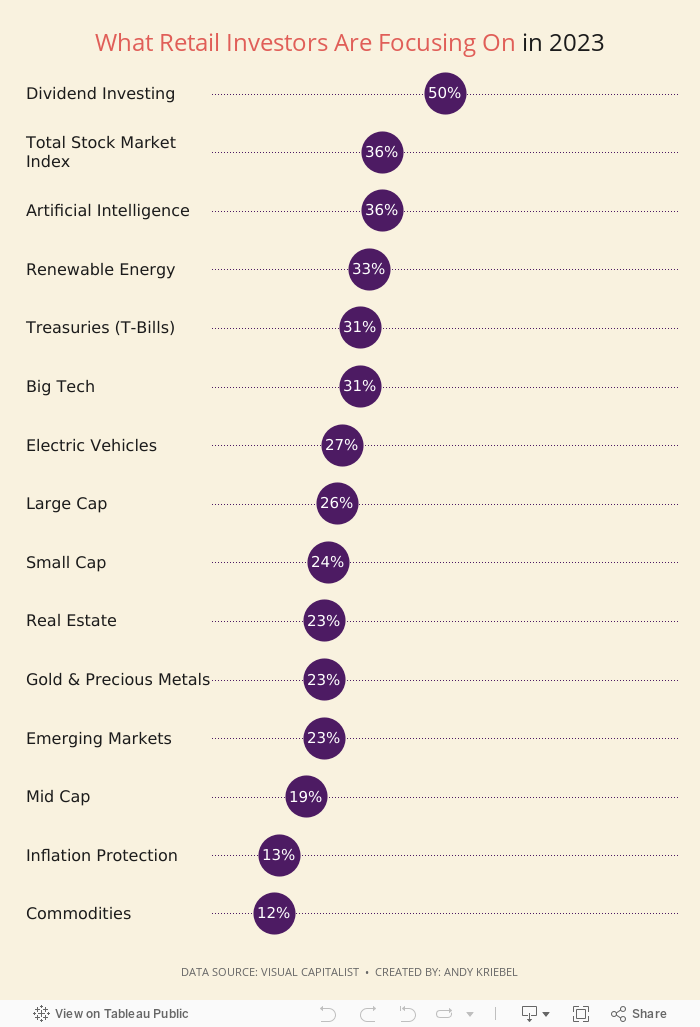
Behind the Chart Redesign: Retail Investment Step-by-Step Makeover

Catch up on my latest #MakeoverMonday Watch Me Viz. I dive into a step-by-step redesign of Visual Capitalists "What are Retail Investors Interested in Buying in 2023?" chart.
Starting with an overview of the original visualization, I review the gaps and areas for improvement. Why was a makeover necessary, and what potential did we see?
The livestream walks you through the entire transformation process, from the initial critique to the final touches.
Expect to uncover advanced design techniques and gain insights into the strategic thought process behind each decision.
Whether you're an aspiring designer or a seasoned data analyst, this step-by-step makeover promises valuable takeaways for all.
September 4, 2023
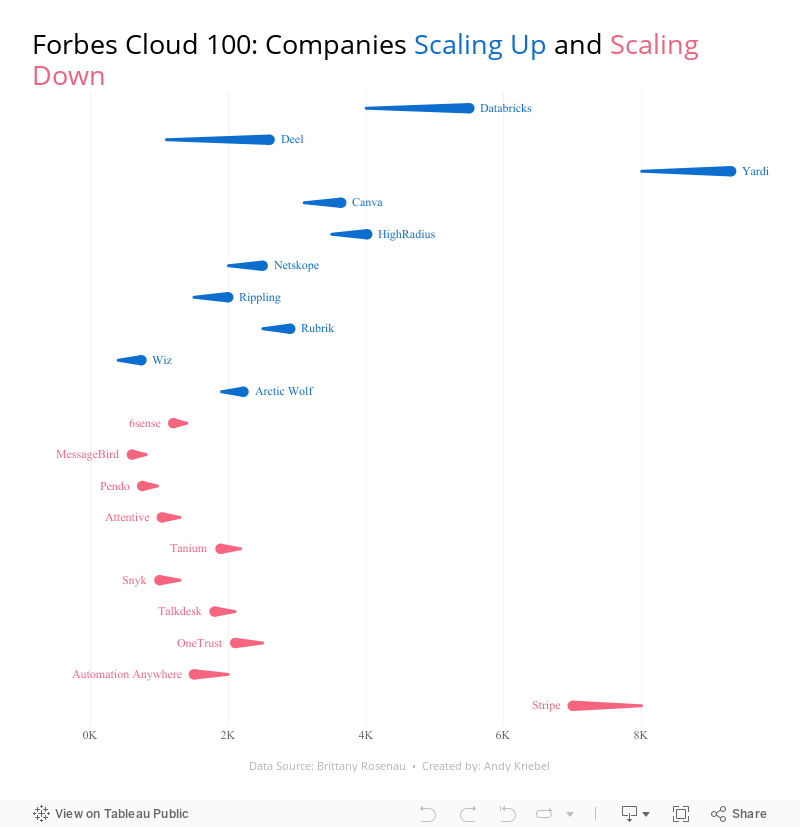
28 Charts in 60 Minutes - Forbes Cloud 100: Companies Scaling Up and Scaling Down

How many people power the Forbes Cloud 100? Is there a correlation between company rank and employee size? Have they expanded or contracted.
Learn how to build 28 charts in 60 minutes that compare two years.
August 23, 2023
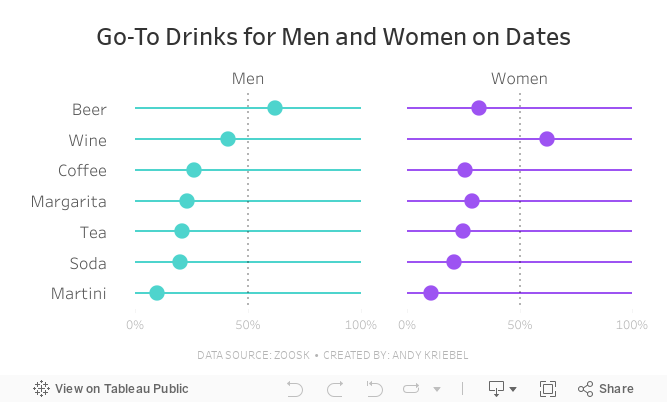
#MakeoverMonday Week 34 - Go-To Drinks for Men and Women on Dates

Join me for live analysis of Zoosk's recent survey, covering 8,793 members' dating drink preferences!
In this livestream, I'll break down the responses across 7 different drink types, comparing the preferences between men and women.
Is there a gender divide when it comes to what people choose to drink on dates?
I'll explore this question and more.
July 31, 2023
#MakeoverMonday 2023 Week 30 - Drinking Fountains in Milan

You'll learn about:
- Joining spatial data sources
- Parameters
- Hexbin maps
- Custom shapes
- Using mapbox maps
- Dashboard layout containers
- Dynamic Zone Visibility
- Parameter Actions
- Custom colors
- Drill down / drill up actions
Enjoy the video and check out the viz below.
July 25, 2023
The Big Thaw: Exploring the Disappearing Antarctic Sea Ice

- Visualizations from chapter 12 of the Makeover Monday book that showed how to add context to visualizations
- Several of the vizzes from 2018 week 15, each with their own unique take on the data
- The original viz by The Guardian
July 11, 2023
#MakeoverMonday 2023 Week 28 - Global Passport Rankings

- Grouped bar chart
- Bar in bar chart
- Grouped bar chart with a gantt bar for the difference
- Diverging bar chart
- Histogram
- Butterfly chart
- Barbell chart
- Scatter plot
- Slope graph
- Trellis chart
- Jittered bar chart
June 26, 2023
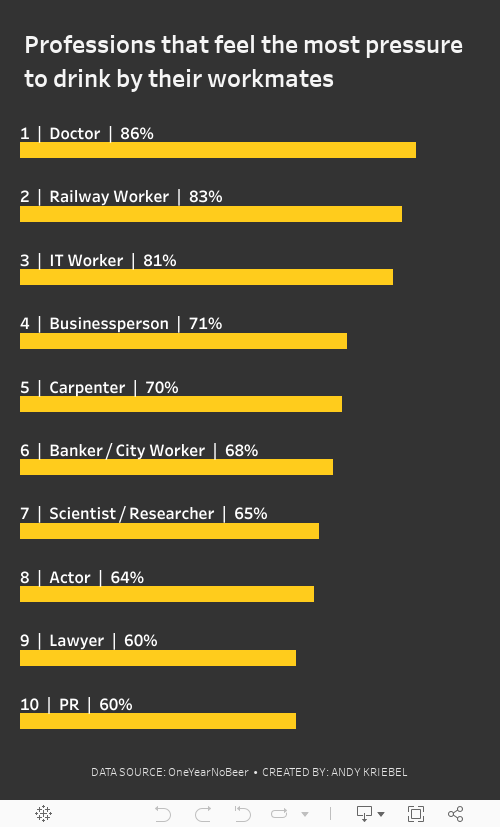
#MakeoverMonday 2023 Week 26: The UK's Drinking Culture

June 12, 2023
#MakeoverMonday 2023 Week 24 - Cereal and the Green Revolution: Yields vs. Land Use

At the global level, how has crop production changed over the last fifty years?
In this Watch Me Viz live stream, I analyzed how the yield and land use of producing cereal has changed over the last 50 years.
I really liked the original visualization, so I rebuilt it in Tableau. I learned how to use dynamic zone visibility, layout containers, and more. Check it out.
Resources:
1. Data - https://data.world/makeovermonday/2023w24
2. Final Dashboard - https://tabsoft.co/3P3Sdl3
===============
Watch Me Viz is a weekly live stream where I help people become better at #Tableau, #PowerBI and data analysis. I show how I take an existing visualization, critique it, analyze the data, and build several visualizations all the while looking for a "better" visualization than the original.
If you are considering participating in Makeover Monday, you can get started by downloading data sets from the Makeover Monday website. I promise you'll become better at data analysis and data visualization by practicing every week.
Data sets - https://www.makeovermonday.co.uk/data/
===============
LEARN FROM ME
Join my newsletter. Sign up at andykriebel.com.
ARE YOU INTERVIEWING FOR A NEW JOB?
Contact me for more information about how I can help you prepare for that big interview.
===============
CONNECT WITH ME
More Watch Me Viz - https://bit.ly/WatchMeViz2023
February 20, 2023
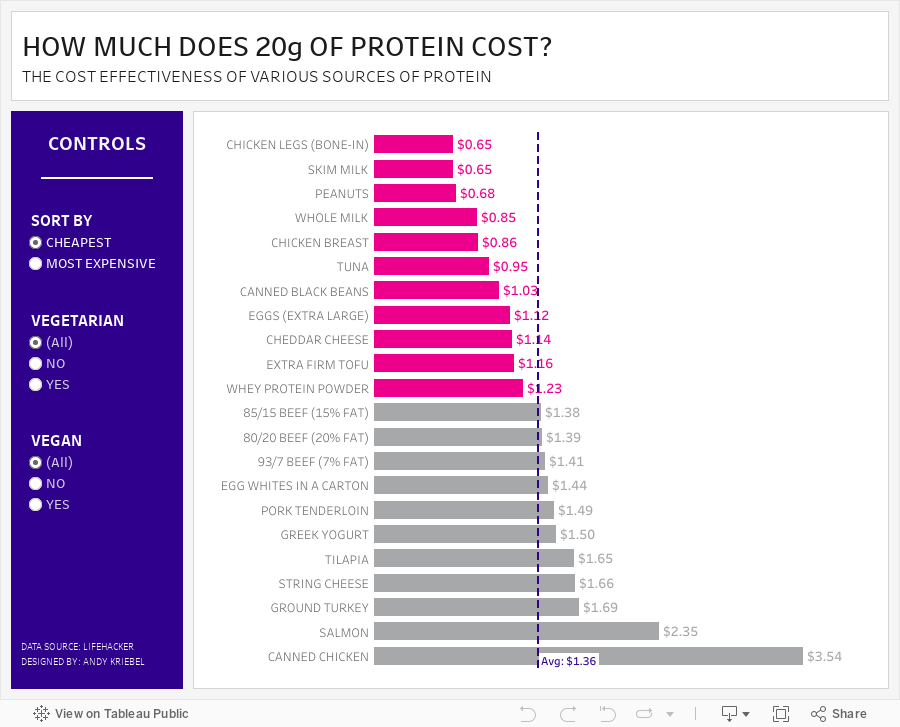
#MakeoverMonday 2023 Week 8 - The Cost Effectiveness of Protein Sources

This week we explored the cost of 20g of protein in various foods. During Watch Me Viz, I showed how to create toggles to allow the user to filter by vegan and vegetarian foods. I did this with parameter actions; if you want to learn more, watch the video below.
In the end, though, my fancy filtering with parameter actions didn't quite work out. I hadn't account for the option when the user might want to look at all foods. So I ended up using basic filtering. I overcooked the whole process, but I bet you'll learn something anyway.
I then went through the entire dashboard design process using containers, padding, shading and more. Check that out if you're interested in learning how to use layout contains.
Here's the #WatchMeViz recording, followed by the interactive viz. Enjoy and thanks for watching!
January 30, 2023
#MakeoverMonday 2023 Week 5 - Where can you find a cheap slice of pizza in New York City?

- Prepare the data: calculations, joins, spatial intersections, and more
- Create maps: hexbin maps, map layers, spatial joins, using maps as shapes
- Create line charts and heat maps that are simple and effective (don't overcomplicate things)
- Build a dashboard using layout containers
January 3, 2023
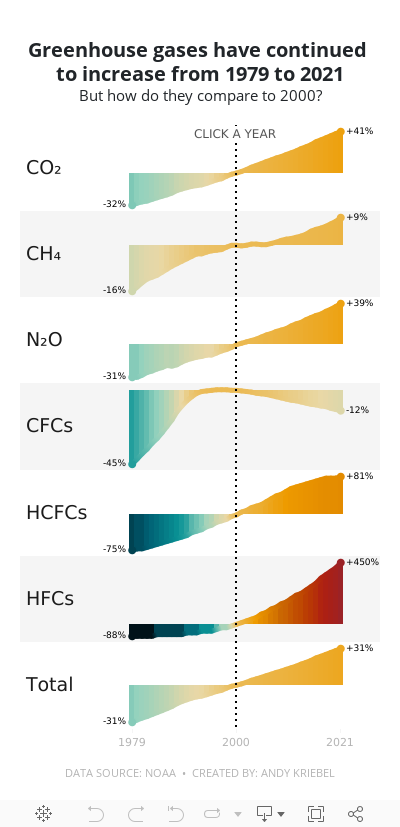
#MakeoverMonday 2023 Week 1 - The Change in Greenhouse Gases in the Atmosphere

2023 is here and #MakeoverMonday will be here the entire you to help you continue to learn and improve. Come on the journey with us each week. Build your portfolio. Showcase your skills. You just might get that job you've been seeking. It's happened, a lot, by participating every week.
For week 1, we were analyzing greenhouse gases in the atmosphere from 1979-2021. The original visualization is quite simple.

We have CO2 and total gases on the left axis and the variance to 1990 on the right. Overall, the chart is pretty easy to read, with the exception of knowing that the red line is always compared to the 1990 value. That definitely needs to be more clear. It's also missing a title, so without the website it is posted on, you wouldn't necessarily know what it's about.
For my viz, I started by reproducing the original, but it doesn't look as good because the data we have starts at 1979. So you miss the big upward curve. From there, I focused primarily on making good looking sparklines that show comparisons with a parameter action. I also showed how to create an "area chart" with multiple colors. I'm going to create a tip video for it; I like how it turned out.
Here's the livestream and below is the visualization for you to interact with. The viz does not render properly on Tableau Public, but hopefully you get the idea.
I hope you continue to join me throughout the year so that we can learn together.
Have a wonderful 2023!
December 13, 2022
#MakeoverMonday Week 50 - Which Countries Get the Most Vacation Days?

December 6, 2022
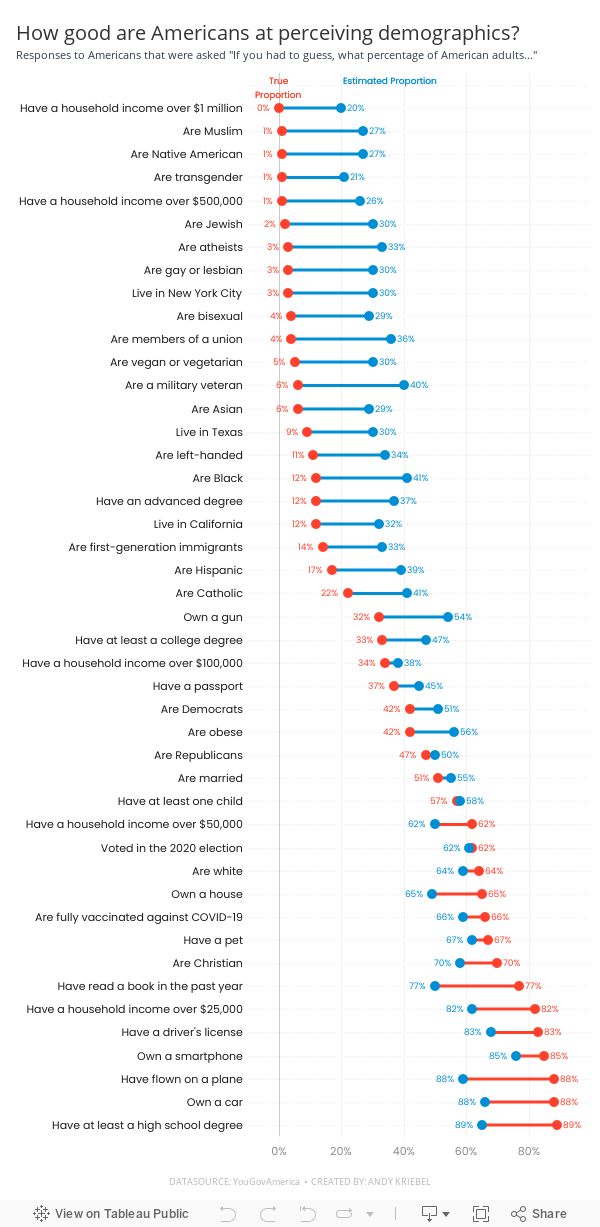
#MakeoverMonday Week 49 - How good are Americans at perceiving demographics?

- Barbell chart with dots on the ends and a line connecting them
- Coloring the lines by the larger value
- Choosing the colors
- Formatting the view (except the labels)
- Labeling the dots/ends of the lines; this took several iterations on the calculations
- Creating the color legend as headers; I had to use reference lines, turn on totals, move the totals to the top, then work on the formatting to get them close. They still aren't perfect.
- Creating the horizontal reference lines; this required me to create a dummy axis
November 22, 2022
#MakeoverMonday Week 47 - Worldwide Railroad Infrastructure Quality Rankings

- Recreating the original bar chart
- How to create a bump chart
- How to use a diverging color palette and alias country names
- How to create a ranked dot plot
- How to use parameter actions to sort the view
- How to use a filter action to remove the highlighting
November 14, 2022
#MakeoverMonday Week 46 - The Cost of Cocaine & Heroin

Quite the interesting topic this week. I get an email from The Economist regularly and there was an article about the wholesale price of cocaine. That led me down a rabbit whole and I found the data, but also for heroin and also for retail prices.
On Watch Me Viz, I stuck with simple lines charts that compared the price for a country to the overall price for all of the countries in the data set. I allow the user to choose a drug and a country.
I then wanted to show how to Dynamic Zone Visibility feature works (if you haven't seen it, be sure to watch it back). In the end, a simple dashboard that compares the measures in two ways, allows for some filtering, looks good, and that's it.
Check out the dashboard below the video.






