October 17, 2023
The End of an Era: Watch Me Viz's Decline Unveiled

That's a wrap. Watch Me Viz has retired, for good.
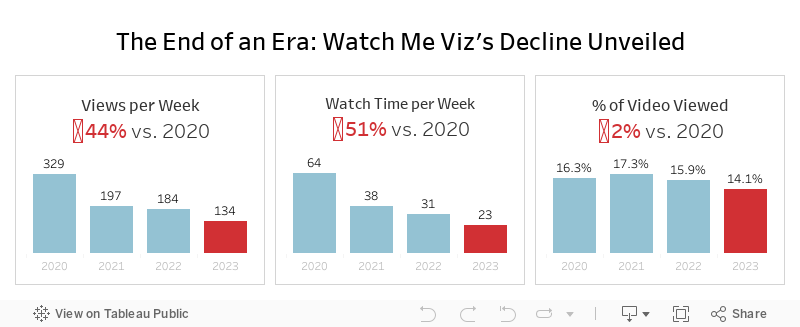
This week's data was about the performance of all of the WMV livestreams. There was some incredible viewer participation, which ultimately led to this viz that explains why WMV should quietly disappear.
Check out the livestream below.
August 29, 2022
#MakeoverMonday 2022 Week 35 - The World's Biggest Military Spenders

Makeover Monday is back! Every Monday I'll be running a #WatchMeViz and every Wednesday, Eva will be running #VizReview. Subscribe to my YouTube channel for reminders of the latest events.
https://youtube.com/andykriebel
This week was a makeover of a visualization by Visual Capitalist about the top 10 military spenders. During Watch Me Viz, I iterated through 15 different charts before settling on a bump chart. If you want to learn about sets, parameters, table calculations, containers and more, watch the video below.
Below the video you can see my viz, or click here. Enjoy! If you need clarifications on anything, please comment on the video here.
January 26, 2021
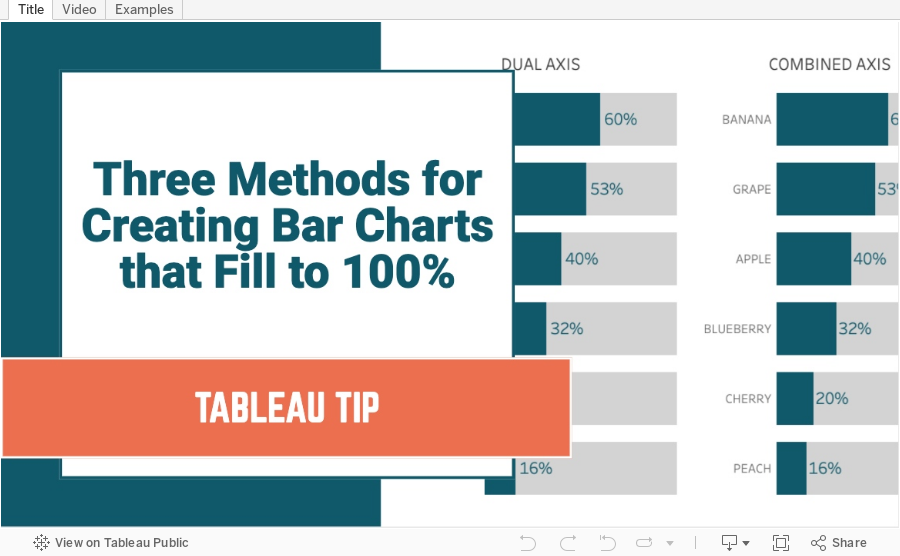
Three Methods for Creating Bar Charts that Fill to 100%

January 25, 2021
#MakeoverMonday Week 4 - Coal Production in India

- Watch Me Viz - https://youtu.be/ur3Vhs7Ceck (also below)
- Tableau Workbook - http://bit.ly/MM2021W4

What could be improved?
- There's no title.
- The District names are way too small. My old eyes can't read it.
- I don't understand the sorting. I would pick one of the metrics to sort by.
- The comparisons need to be more clear, if that is the intent.
Watch Me Viz
Final Dashboard (click to interact)
September 28, 2020
#MakeoverMonday 2020 Week 39 - Child Marriage Around the World
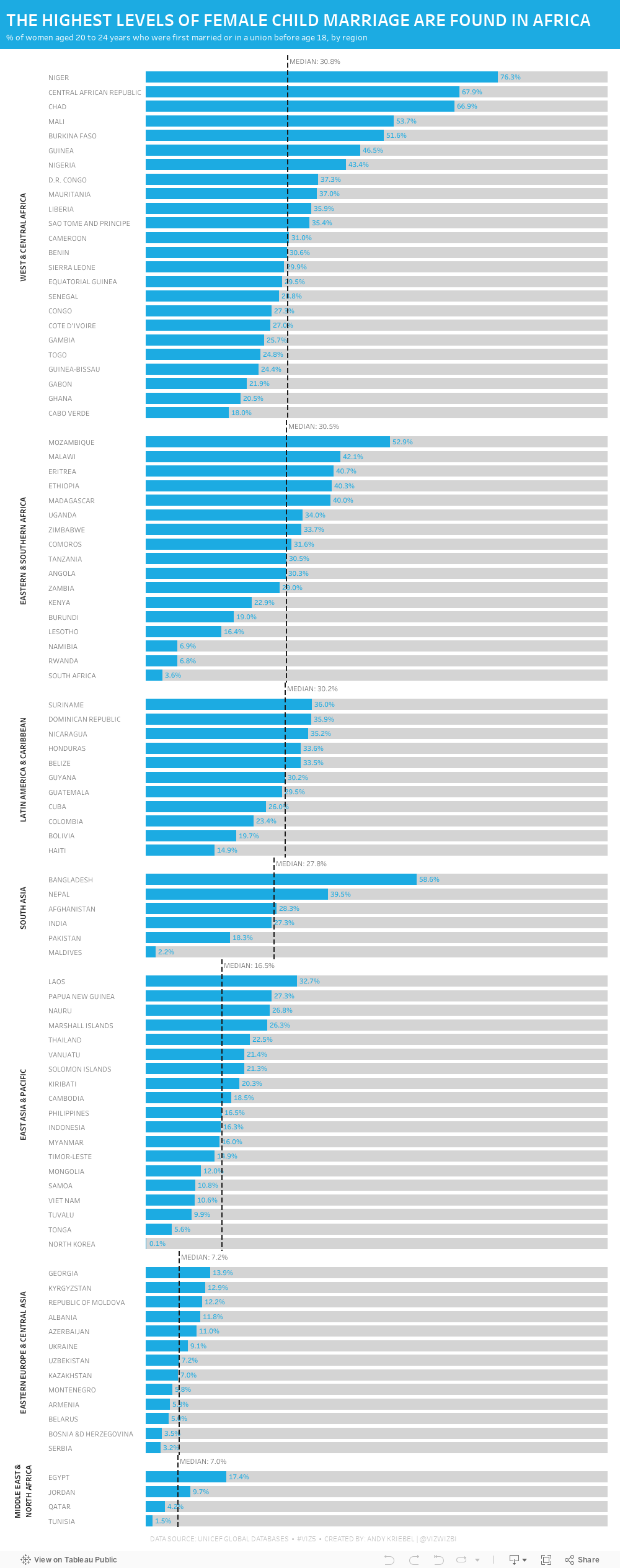
Week 39 brought another #Viz5 topic, this time it was about children that are now 20-24 who were married under the age of 18. Child marriage is, of course, horrific and it's a violation of human rights. Unicef has done an excellent job of recapping all of the issues and why these marriages happen on their website here.
As I've mentioned before, I ALWAYS find these Viz5 data sets tought. I'm not sure why; perhaps I have a mental block on them now. This week the data set was three columns: country, female %, and male %. That can't be too tough...right?
Well, I sure made it tough. First, I joined the data to regional mappings from Unicef so that I could possibly look at the data at the regional level; I decided to use medians for each region in the end. Then I went into Tableau and built a bunch of charts to explore the data. I used chart guides to help me think through options and none of them seemed to make any particularly interesting insights pop out.
After about two hours of nothing, I got the idea of simply looking at the % of females that were married under the age of 18. I ended up with a simple bar chart, which turned out to not be too far from the first chart I created a few minutes in.
Here's the #WatchMeViz video and below is the visualization. Thanks to those that watched live and contributed ideas along the way!! It really helps knowing others are there encouraging me.

March 6, 2017
Makeover Monday: Who are YouTube's Biggest Gaming Stars?

- Tables are great for looking up specific values. Want to know how many views and/or subscribers the 73rd highest channel has? A table makes finding that really easy.
- Tables are precise; they provide exact values.
- The table is sorted by the rank, making it easy to process who is most popular.
- There's no real story to the data.
- Tables aren't engaging.
- Comparisons are difficult - How do the top 20% compare to the rest?
- How do the top 20% of channels compare to the rest? Do they fit the Pareto principle?
- How many views do the top 10 channels have and how can I best compare them?
February 21, 2016
Makeover Monday: Who are America's Biggest Bandwidth Hogs?

This week’s Makeover Monday was considerably “easier” than last week’s in that the data set was only nine data points and was really just a simple makeover of a bad chart choice. As David Pires noted, it might seem like I pick on Business Insider; I can assure you I’m not doing so intentionally. They simple provide simple example that work well for this project. Their fault, not mine.
In researching this makeover, I ran across this article from Walter Hickey, also of Business Insider, titled “The Worst Chart In The World”. In the article, which I encourage you to read, Walter walks through the pretty typical reasons for why pie charts are bad choices. Much of the same argument can be applied to this week’s donut chart, which is basically a pie chart with a whole in it, making it arguably even worse than a pie chart for comparing parts to a whole.
Given the article Walter wrote, it’s a shame to see his ideas not permeating across Business Insider. Any ideas on how we can help him spread the good word about data visualisation?
This week I wanted to apply the simple step-by-step approach to the makeover that I’ve used in the past. The idea was sparked by this article by Darkhorse Analytics. Emily Kund has also told me in the past that she really likes when I apply this step-by-step method to my makeovers because she thinks it’s a better learning experience. The charts I makeover don’t always fit this recipe, but I’ll do my best to use this approach when possible.
So flip through the story points one at a time and watch the makeover unfold. Enjoy!
April 21, 2015
Tableau Tip Tuesday: Star Wars - The Force Awakens (Embedding Audio & Video in a Dashboard)

Just announced at Star Wars Celebration: The Force Awakens Teaser was watched over 88M times in its first 24 hours globally! Thanks to all the fans for a record breaking and truly historic response!
Posted by Star Wars on Sunday, April 19, 2015
Today’s tip is about embedding YouTube videos and Soundcloud audio into a Tableau dashboard. It’s pretty simple. Scroll down below the viz for the instructions. May the Force be with you!
- Drag a Web Page object onto the dashboard.
- When prompted for the URL, you want to grab the embed code:
- Copy the string after the “src=“ and add "?rel=0&showinfo=0” onto the end of it. The URL should look like:

The process for embedding audio is much the same.
- Go to the track on Soundcloud.
- Click on the Share button.
- When the share window appears, click on Embed at the top.
- Scroll to the bottom and click on More Options.
- Choose the size and check the Automatic play box.
- Copy the embed code.
- Select the text after the “src=“ and copy it
- Add a Web Page object onto the dashboard.
- Paste the copied text in the URL box.
That’s it!






