July 31, 2023
#MakeoverMonday 2023 Week 30 - Drinking Fountains in Milan

You'll learn about:
- Joining spatial data sources
- Parameters
- Hexbin maps
- Custom shapes
- Using mapbox maps
- Dashboard layout containers
- Dynamic Zone Visibility
- Parameter Actions
- Custom colors
- Drill down / drill up actions
Enjoy the video and check out the viz below.
October 25, 2022
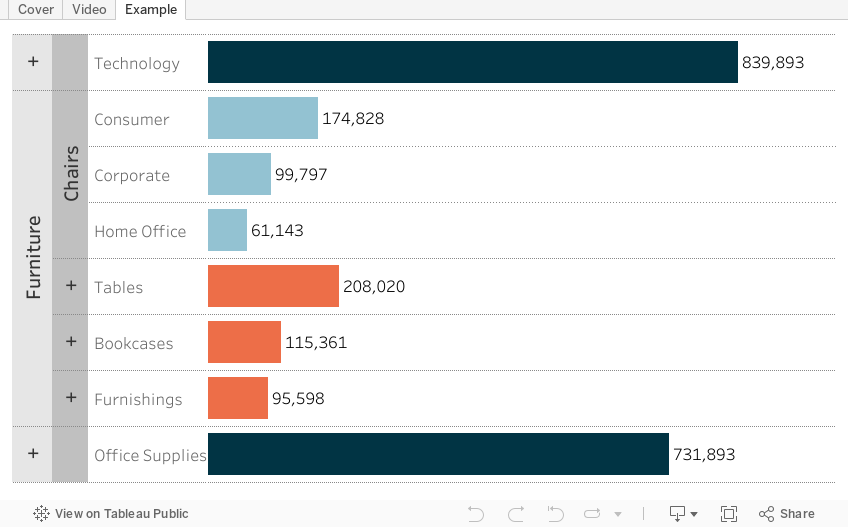
How to Create a 3 Level Drill Down in Tableau
I've showed you in several videos and WatchMeViz live streams how to create a 2 level drill down. And naturally the follow up question is always, how can I go one level deeper? This tip has exactly what you're looking for. I show you how to create a 3 level drill down in Tableau.
This example shows you how to drill down from Category to Sub-Category to Segment. All you need to do for your situation is replace the dimensions I'm using with yours. This will work with any combination of 3 dimensions.
Check out the interactive version below the video.
This type is inspired by this example from Lindsey Poulter - https://public.tableau.com/app/profile/lindsey.poulter8872/viz/SetActionDrilldown/ChooseaMetric
May 12, 2021
How to Create a Time Series Drilldown with a Set Action

November 17, 2020
How to Create a Single Column Hierarchy Drill Down Drill Up with Parameter Actions

Twice recently I've used parameter actions to create a single column drill down and drill up to mimic a hierarchy.