April 10, 2024
11 Ways to Compare Two Measures
I don't believe in complexity in data visualization. I stick with simple charts when you needs to compare measures to add context.
Tableau workbook here.
April 7, 2024
How to Create a Barbell Chart in Tableau
A barbell chart is a dot plot that shows two or more points and also connects those points to display the range.
March 8, 2024
Visualizing Time Series Data in Tableau
Last night I was invited to speak at the Chicago Tableau User Group about visualizing time series data. Other than spatial data, time series data is my favorite to visualize.
There seem to be endless methods for making time series data useful for analysis. Check out this video for 60ish ways to visualize time.
I had a 20 minute slot to present and, of course, I ran over time. I seem to do this with every session I run lately. Be it training for Next-Level Tableau, presenting at events, or running a livestream, I get into a groove and don't want to stop.
I was able to create 14 vizzes in 20+ minutes. I added an extra in this workbook to make the dashboard format nicely.
Click on the image below to download the workbook and dissect it. Get the data here to follow along.
Have fun!

September 12, 2023
#MakeoverMonday Week 37 - First time home buyers in the UK are being shut out of the market

September 5, 2023
60 Unique Ways to Visualize Time in Tableau

September 4, 2023
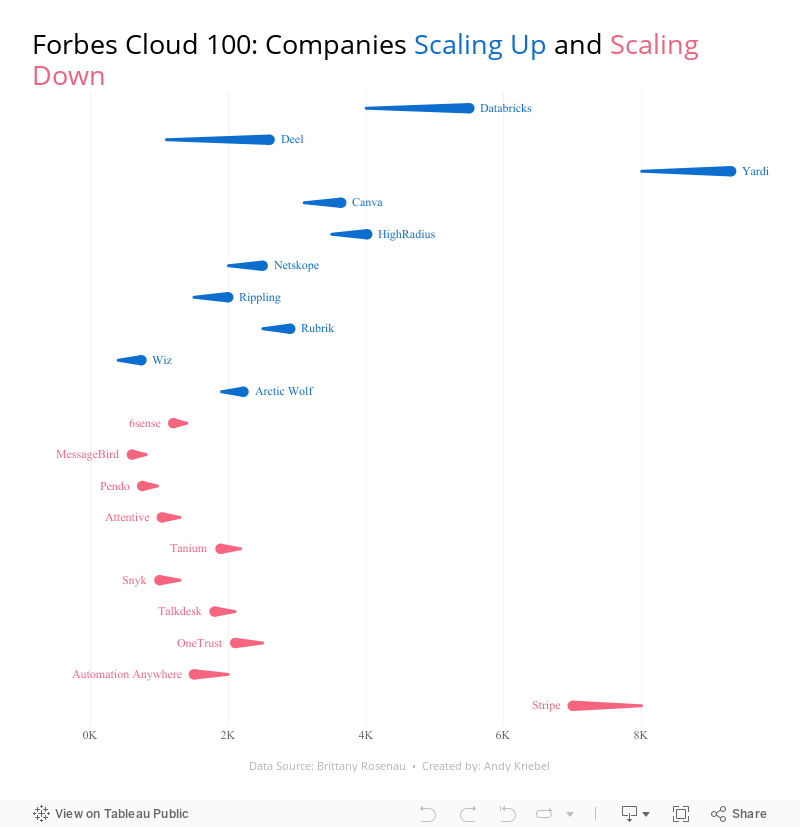
28 Charts in 60 Minutes - Forbes Cloud 100: Companies Scaling Up and Scaling Down

How many people power the Forbes Cloud 100? Is there a correlation between company rank and employee size? Have they expanded or contracted.
Learn how to build 28 charts in 60 minutes that compare two years.
August 15, 2023
An 8-Chart Guide to Dashed Lines in Tableau

In this tip learn when to use of dashed lines. Through this video, I'll walk you through 8 distinct examples, demonstrating the effectiveness and clarity that dashed lines can bring to your data representation:
- Line Chart with Dashed Elements: Understand the basics of creating dashed lines.
- Multiple Lines Differentiation: Explore how to distinguish multiple measures using varied dashed patterns.
- Line/Area Chart Combination: Integrate dashed lines with filled areas.
- Comparison to a Moving Average: Learn how dashed lines can contrast raw data against its moving average, helping in trend analysis.
- Current Year vs. Prior Year: Used dashed lines to make year-on-year comparisons.
- Combination Chart: Combine several chart types, using dashes to maintain clarity.
- Barbell Chart Analysis: Learn how dashes can link data points in a barbell chart, highlighting change and consistency.
- Forecast vs. Actuals: Create a forecast with dashed lines.
July 11, 2023
#MakeoverMonday 2023 Week 28 - Global Passport Rankings

- Grouped bar chart
- Bar in bar chart
- Grouped bar chart with a gantt bar for the difference
- Diverging bar chart
- Histogram
- Butterfly chart
- Barbell chart
- Scatter plot
- Slope graph
- Trellis chart
- Jittered bar chart
February 15, 2022
How to Create a Barbell Chart
May 24, 2021
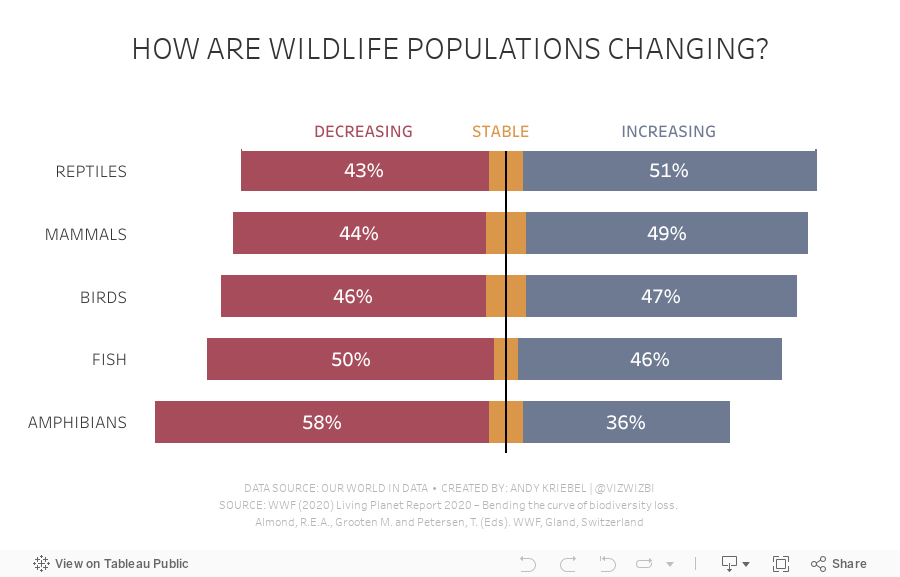
#MakeoverMonday 2021 Week 21 - How are wildlife populations changing?

February 8, 2021
#MakeoverMonday Week 6: Why Are Women Perceived to Be Unequal to Men?

Wow! What a fun #WatchMeViz that was! I iterated through 16 charts and then when the idea solidified, there was some great conversation and feedback on the chat to help me get to the end. I find survey responses quite difficult to visualize, so instead of getting frustrated, I thought about all of the ways I can compare data to see if anything would work.
Most importantly, thank you to all of your on the live chat. It makes a huge difference to me and I love getting your feedback and questions along the way. You make me better. You can find the final visualization below the video.

November 16, 2020
#MakeoverMonday Week 46: The Growth of Internet Ad Spend - 2020 vs 2012
Thanks for attending #WatchMeViz (link) for #MakeoverMonday Week 46. I enjoy the commentary and ideas you provide along the way. I hope you're learning something as well.
The topic this week was the switch in advertising revenue to the internet.
In the video, I first reviewed the initial visualization and talked about what works and what does. I then iterated through 17 different methods for visualizing the data, before settling on the one below which was inspired by Ellen Blackburn's viz about eligible free school meals and educational attainment (link)
RESOURCES
- Data Set - https://data.world/makeovermonday/2020w46
- Chart Guide - https://chart.guide/

October 26, 2020
#MakeoverMonday 2020 Week 43 - #WatchMeViz - Apparel Exports to the U.S.
For #MakeoverMonday week 43 we analyzed data about apparel exports to the US during the Coronavirus pandemic. In this session of #WatchMeViz, I showed 28 different ways to visualize time series data (there are way more) before we all settled on a viz that's basically the same as the original and looks nicer.
Subscribe to my YouTube channel here to get all of my latest Tableau Tips and notifications for upcoming live streams.
Show Notes / References:
- Data Set - https://data.world/makeovermonday/2020w43-apparel-exports-to-us
- Tableau Reference Guide (incredible repository of thousands of Tableau tips) by Jeffrey Shaffer - http://www.tableaureferenceguide.com/
- How to Shade Between Two Lines with Polygons by Rody Zakovich - http://www.datatableauandme.com/2017/08/how-to-shade-between-2-lines-in-tableau.html
- Title Capitalization - https://capitalizemytitle.com/

January 11, 2016
Makeover Monday: Stephen Curry Hates Mid-Range Jump Shots

This week's Makeover Monday looks at this simple stacked bar chart from Sports Chart of the Day:

What works well:
- Nice labelling on the axes; this makes it clear what we data is displayed
- Nice annotation of the point of the chart
What could be done better:
- Needs a better title
- Needs to incorporate shooting % so that I can better understand the relationship between shots taken and shooting %
- Group together all shots over 30 feet
- Find a better way to compare the number of shots taken on each range. I find the stacked bars hard to compare within in a shot distance.
- Make the different shot ranges more clear, e.g., what defines a long 2?
- Provide a summary
- How are Curry's shot selections changing over time?
With these considerations in mind, here is my my makeover of the chart:
Note: If you'd like to participate in Makeover Monday, check this link for the details.
December 28, 2015
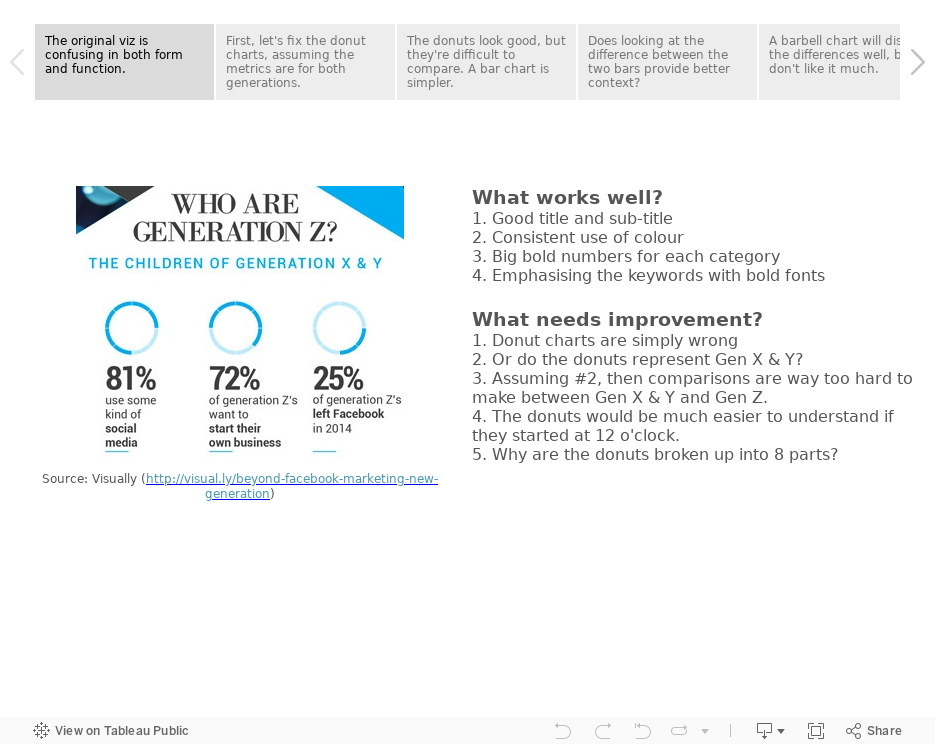
#MakeoverMonday: Who Are Generation Z?


To makeover these charts, I've used Tableau's story points to:
- Discuss what works and what doesn't work
- Take you through my thought process
- Show you alternative visualisations
- Pick a final makeover
How would you do it differently? Download the Tableau workbook and have a crack at it yourself. Leave a comment with a link to your version. Enjoy!
December 14, 2015
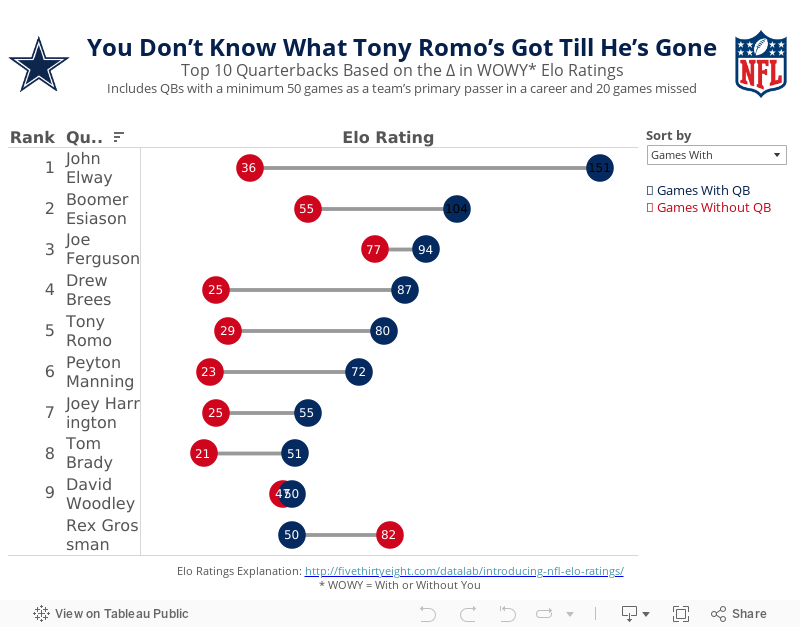
Makeover Monday: You Don’t Know What Tony Romo’s Got Till He’s Gone

Anyone that knows me knows that I despise the Dallas Cowboys and, in particular, their golden boy Tony Romo. As a lifelong Eagles fan, I’ve been indoctrinated into the hatred for anything associated with that ugly blue star. It drives me nuts to hear how much all of the NFL pundits love Tony Romo. He’s never won anything and chokes in the playoffs every time they make them.
So when I saw this article by FiveThirtyEight, it caught my attention. Was I not giving Romo his due? Does that matter anyway? In the article, the author looks at a metric they call WOWY (or With or Without You). In its most basic sense, this metric measures the impact that a particular player has on their team by measuring the Elo rating when that players plays and when they do not. For this piece, they considered quarterbacks that were the primary QB for at least 50 games and missed at least 20 games. They then pared that down to the top 10 based on what they called the WOWY ∆ ELO.
The result is this table:

The table clearly shows Tony Romo as the 3rd most important player to their team based on this metric. Ok fine. But is there more to the story? Can this simple table be made more intuitive for the readers to understand?
I created the barbell chart below. This view makes it much easier to see the difference between the With and Without You metrics. I also added a metric to the view that calculates the difference between the two. I then created a drop down to allow you, the reader, to sort by the metric you find most interesting. In essence, I’ve turned this simple table into four stories:
- WOWY ∆ ELO - This metric shows Romo as the 3rd most missed player in NFL history when he’s out injured.
- Games With - Sorting the chart by the Games With Elo rating, suddenly Romo is only 5th on this list, yet he’s ahead of Peyton Manning. This view also shows just how amazing John Elway was when he played. Elway’s Elo rating is nearly 50% higher than the second best.
- Games Without - Interesting…the teams that Rex Grossman played for actually performed better without him in the lineup. Clearly he was quite terrible as an NFL quarterback. You can also see Romo down in 6th position; the Cowboys are definitely much worse without him.
- Difference - I added this metric to show the variation between the With and Without You values. Now Romo is back in the 3rd position, and look at that gap for John Elway…wow!
Give it a play for yourself. Do you see anything else interesting?
June 25, 2015
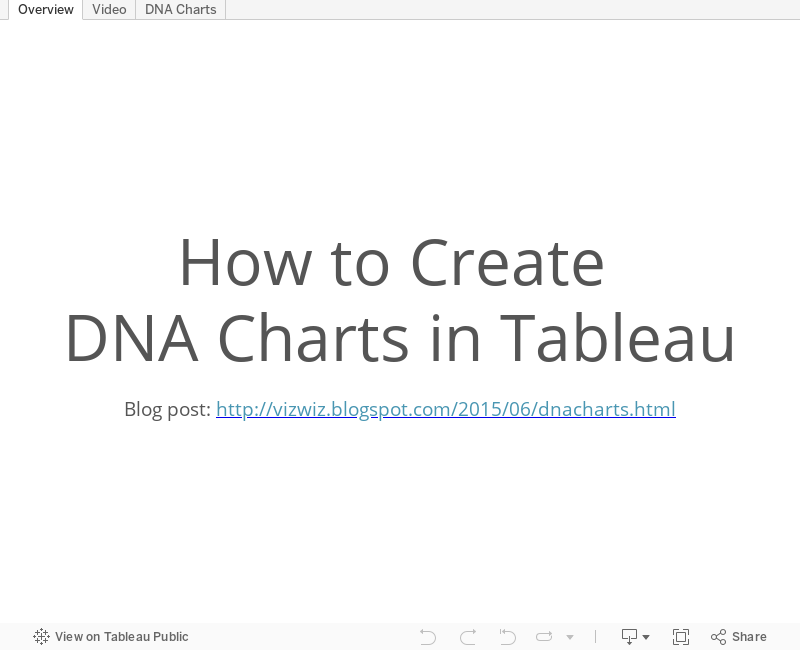
Tableau Tip: How to Create DNA Charts

As part of this exercise, we were building a dot plot and Laszlo Zsom asked how to connect two dots on the same row. I hadn't ever done it before, so I used a Gantt chart to connect them. Then Chris Love suggested using lines.
In this week's tip (two days late as it is), I demonstrate both of these methods. Click on the image below to enjoy the video.