August 7, 2023
#MakeoverMonday Week 32 - The Gap in Parental Leave

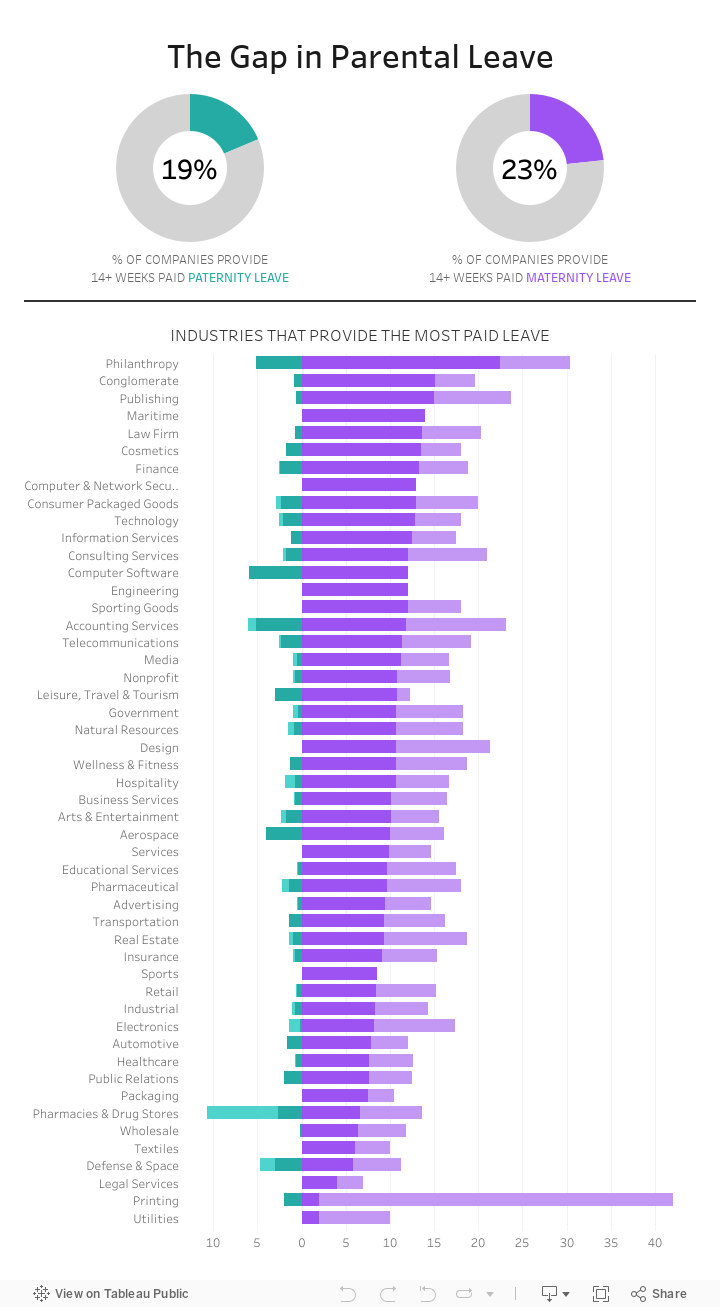
The gap in parental leave is extremely wide across all industries in America.
How do only 23% of women get 14+ weeks of maternity leave? Why isn't progress being made to help dads take a more active role?
Check out the livestream recording and interactive viz below.
September 6, 2021
#MakeoverMonday 2021 Week 36 - How Has American Support For Abortion Changed Since 1975?

Despite the massive setback to women's right in Texas, less Americans are anti-abortion than in 1975. Now maybe if the barbaric dinosaurs in Congress in Texas came into the 21st century, they'd finally realize women are our equals and we shouldn't control them. It's all very, very disgusting. They should be ashamed, but of course they're not. In fact, they are quite proud of what they "achieved".

May 17, 2021
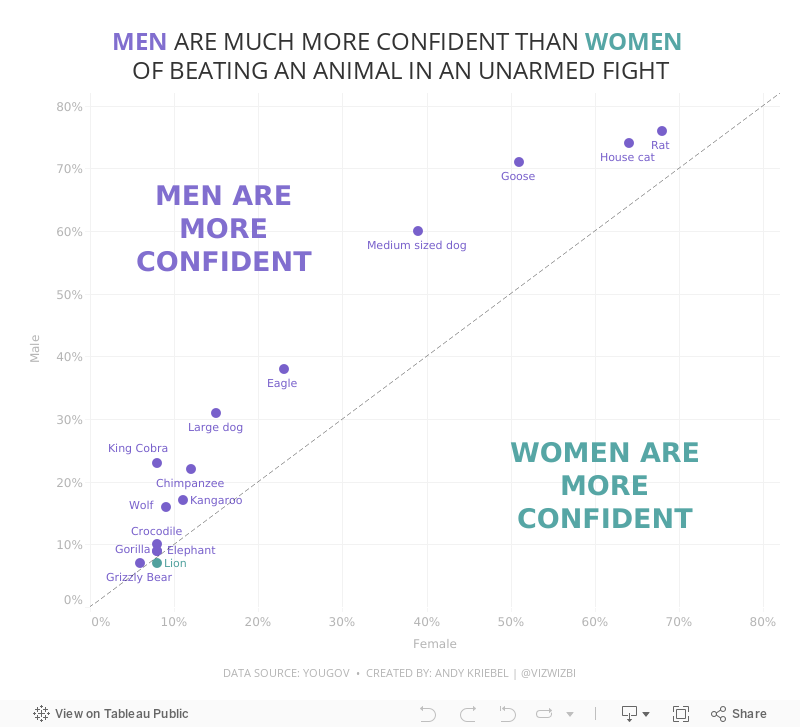
#MakeoverMonday Week 20 - Humans vs Animals

WatchMeViz
Visualization
March 8, 2021
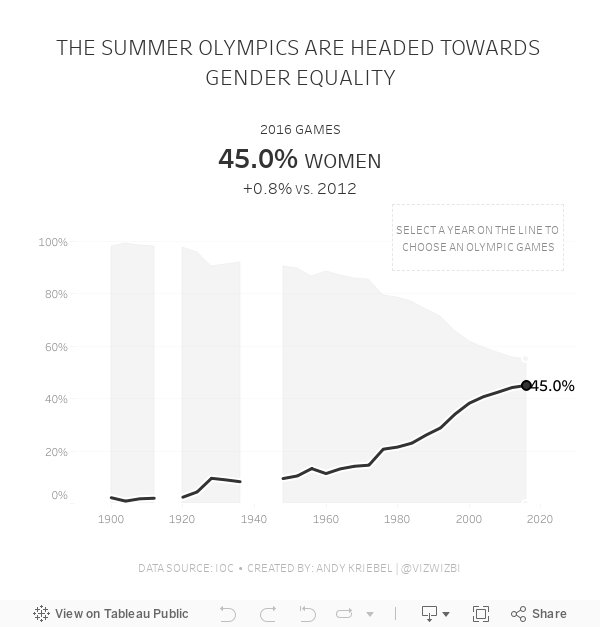
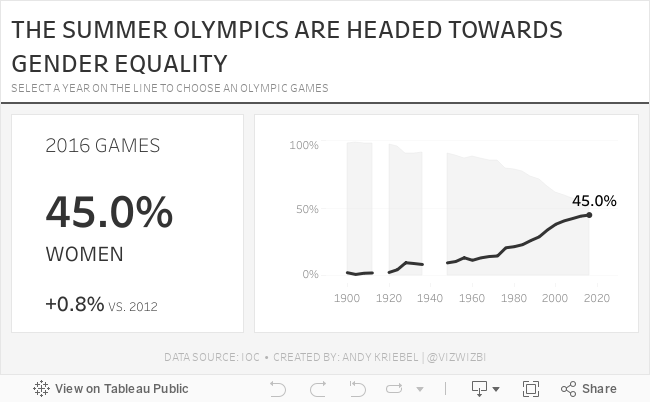
#MakeoverMonday Week 10: Female Participation in the Summer Olympics

First, thank you to Tommaso Ferri for moderating Watch Me Viz. I enjoyed working with this data set and was able to build nine vizzes in about 40 minutes, then took another 40-50 working through formatting and some pesky table calcs. I got there in the end!
After the live stream ended, I created one more version that uses containers. I think I like this one best. Below you'll find the live stream recording as well as the two final visualizations.
Thanks for watching!
March 1, 2021
#MakeoverMonday Week 9 - Seats Held by Women in National Parliaments in the EU


- Clear title
- Line chart is a good choice for a time series
- There are too many colors.
- What's the focus?
- The legend takes up a lot of space.
- The chart ratio is too flat.
- Overall, it's confusing and harder than necessary to find patterns.

February 22, 2021
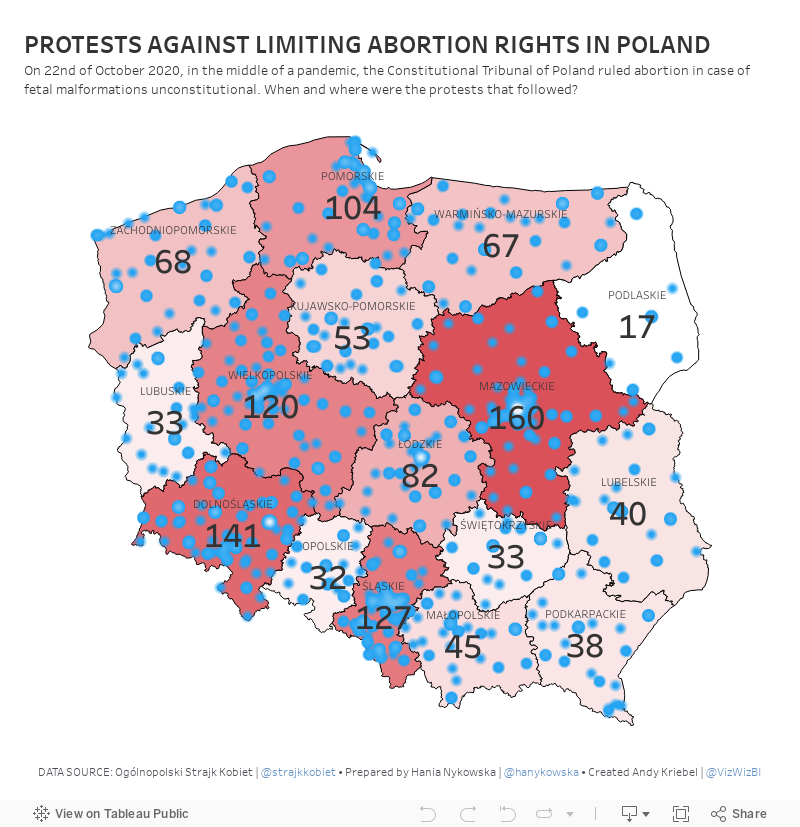
#MakeoverMonday Week 8 - Protests Against Limiting Abortion Rights in Poland

February 8, 2021
#MakeoverMonday Week 6: Why Are Women Perceived to Be Unequal to Men?

Wow! What a fun #WatchMeViz that was! I iterated through 16 charts and then when the idea solidified, there was some great conversation and feedback on the chat to help me get to the end. I find survey responses quite difficult to visualize, so instead of getting frustrated, I thought about all of the ways I can compare data to see if anything would work.
Most importantly, thank you to all of your on the live chat. It makes a huge difference to me and I love getting your feedback and questions along the way. You make me better. You can find the final visualization below the video.

November 19, 2020
Pregnancy, Birth, and Abortion Rates in America

With Amy Coney Barrett being sped through the confirmation process of the US Senate before the 2020 Election (as hypocritical as it was) to become the 9th justice on the Supreme Court, there is now a conservative stranglehold on the judicial branch of government.
Justice Barrett deflected all questions about her stance on abortion during the confirmation process and it has raised lots of speculation that Roe v. Wade will be overturned. Yeah, you know, because the government should control a woman's body, yet there is nothing similar for men. Like, why doesn't a man get castrated if he accidentally impregnates a woman? Blasphemy they say; hypocritical I say.
I wonder if any of the anti-abortion Justice or Congresspeople have ever considered their stance if their daughter had an unplanned pregnancy. What is she got raped and pregnant? I bet their tune would change.
Anyway, my political and social views aside, this made me think about abortion rates in America. Since Roe v. Wade, abortion rates in the US have plummeted.

November 12, 2019
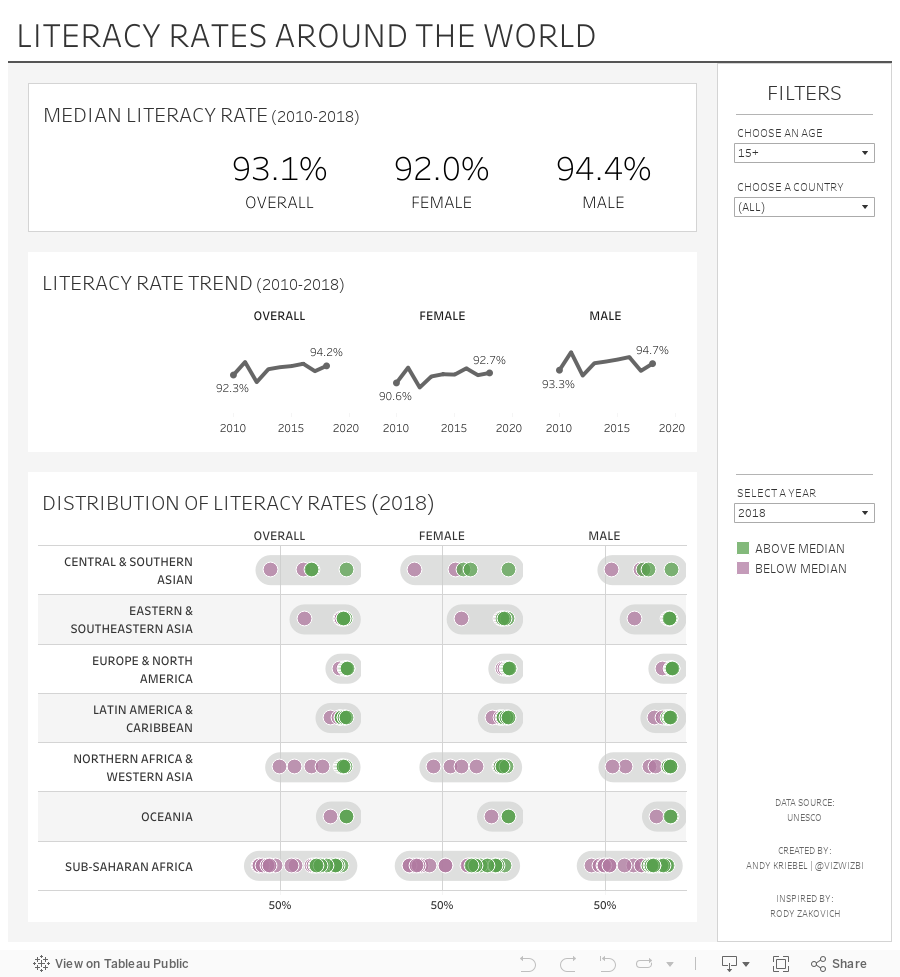
#MakeoverMonday: Literacy Rates Around the World

Here's the original viz:

What works well?
- The data by region is ordered alphabetically, making it easy to find each region.
- The bar chart is sorted by largest to smallest.
- Nice filtering options
What could be improved?
- A diverging color palette should only be used when there is a logical midpoint or goal. I don't see those in this viz.
- The squares are hard to understand.
- I don't find the map very useful. It would be more useful if it zoomed in when a region is selected.
- There's no title.
- There's too much text.
- The bar chart seems to go out past the edge, or at least visually it appears that way.
What I did
- I created a KPI scorecard so that I could understand the patterns for the overall or an individual country. Are literacy rates improving or regressing?
- Show the distribution of the rates of the countries within each region
- Within each region, which countries are above or below the median for that region?
- How has the literacy rate changed over time?
- Allow simple filtering options.
March 17, 2019
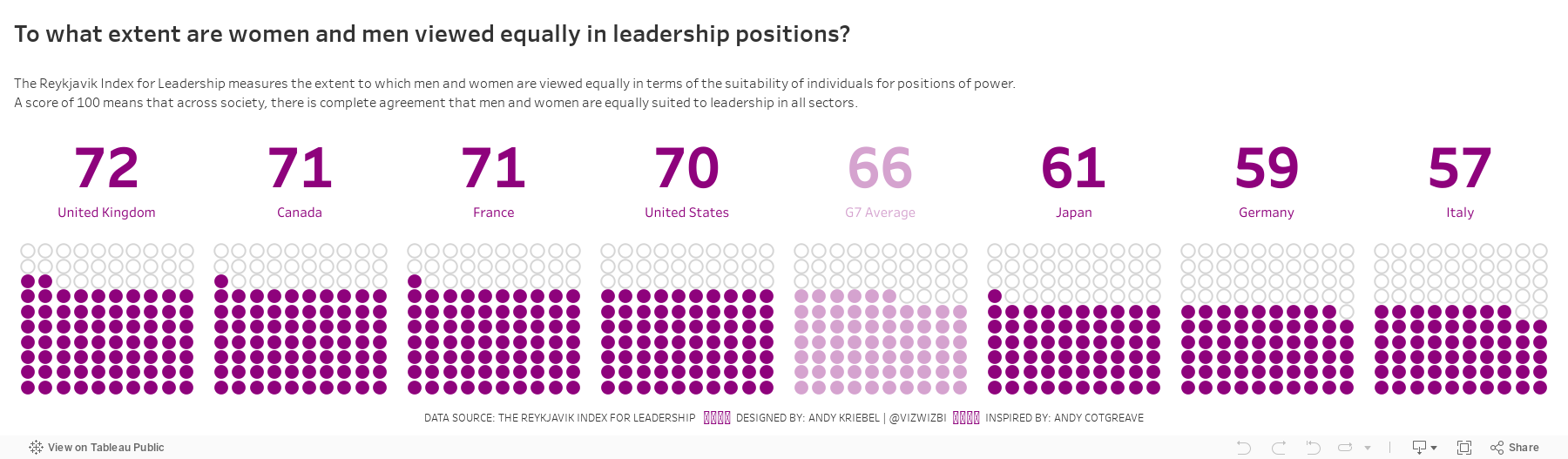
#MakeoverMonday: To what extent are women and men viewed equally in leadership positions?

Let's have a look at the chart:
 |
| Source: World Economic Forum |
WHAT WORKS WELL?
- Ordering the countries from highest to lowest in terms of people that view women and men equally in leadership positions
- Including the G7 average for context
- Assigning a different color to the G7 average
- Labeling the end of the lines
WHAT COULD BE IMPROVED?
- Circular bar charts are horrible for comparisons.
- The title is meaningless.
- The lines start thin, get thicker, then get thin again. Why?
- The title and the center of the chart are the same. That's certainly unnecessary redundancy.
WHAT I DID
March 4, 2019
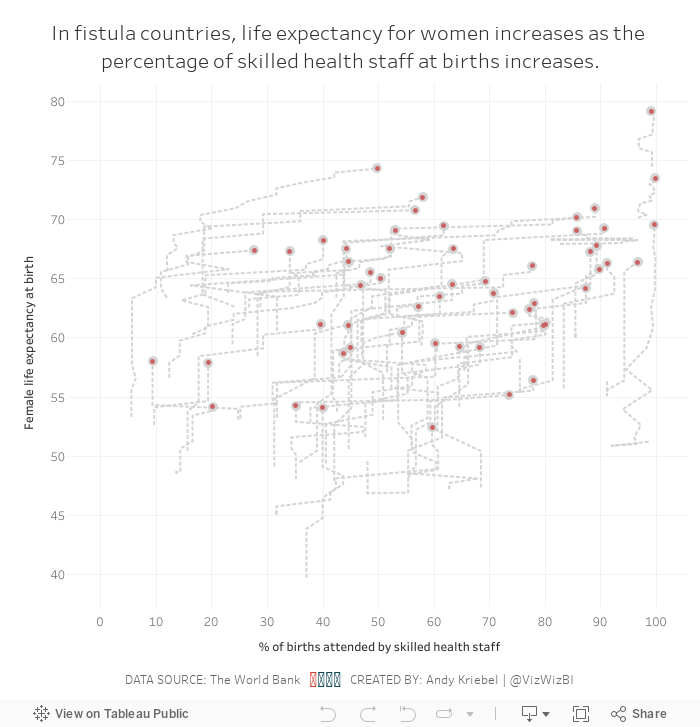
Makeover Monday: Are skilled health staff an indicator of female life expectancy in fistula countries?


What work well?
- Using a continuous color palette
- There are no exceptionally large countries compared to the others, so a filled map is a good choice.
- Normalizing the data to make comparisons across countries more relevant.
- Using grey for countries with no data.
- Good title and subtitle
What could be improved?
- If there is data across years, it would provide additional context to the data. In other words, is the situation improving?
- Make the title bigger; it's too small compared to the large map.
My Goals
- Compared the metrics between fistula and non-fistula countries
- Look at change over time
- Figure out how to deal with all of the nulls
- Be done
December 2, 2018
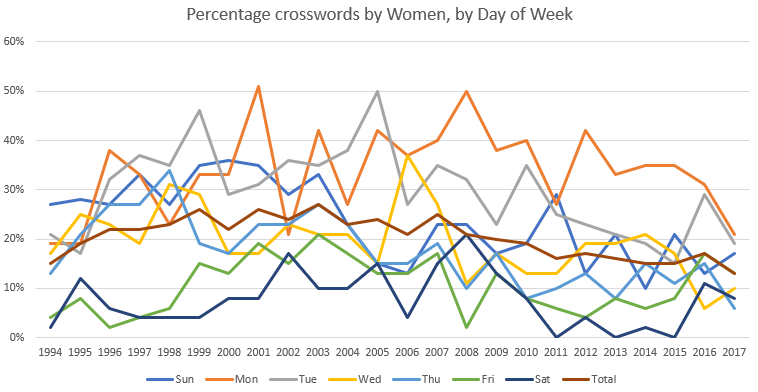
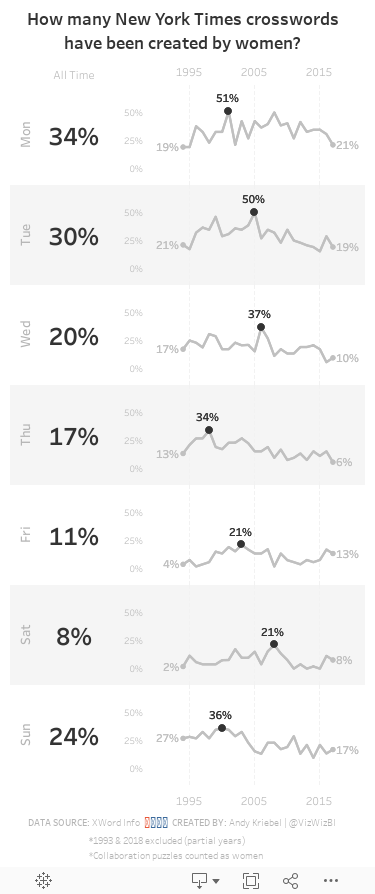
Makeover Monday: How many New York Times crosswords have been created by women?

What works well?
- The title explains what the chart is displaying.
- The x-axis and y-axis are easy to understand.
- Excluding 1993 and 2018 since they are partial years.
- The chart has the proper height-to-width ratio.
What could be improved?
- The title could be a bit more informative. Something like "Over the last 24 years, there have been only three weekdays where women has constructed at least 50% of the crosswords."
- There are too many colors, making the chart distracting and the lines hard to follow.
What I did
- Separated the days into separate charts so the trends for each weekday would be easier to follow
- Created sparklines and highlighted the high point for each weekday
- Labeled the values for 1994 and 2017 for context
- Included a BAN for the overall percentage for each weekday
- Created a mobile layout
- Shaded every other row to distinguish the weekdays and help guide the eye across the chart
October 31, 2018
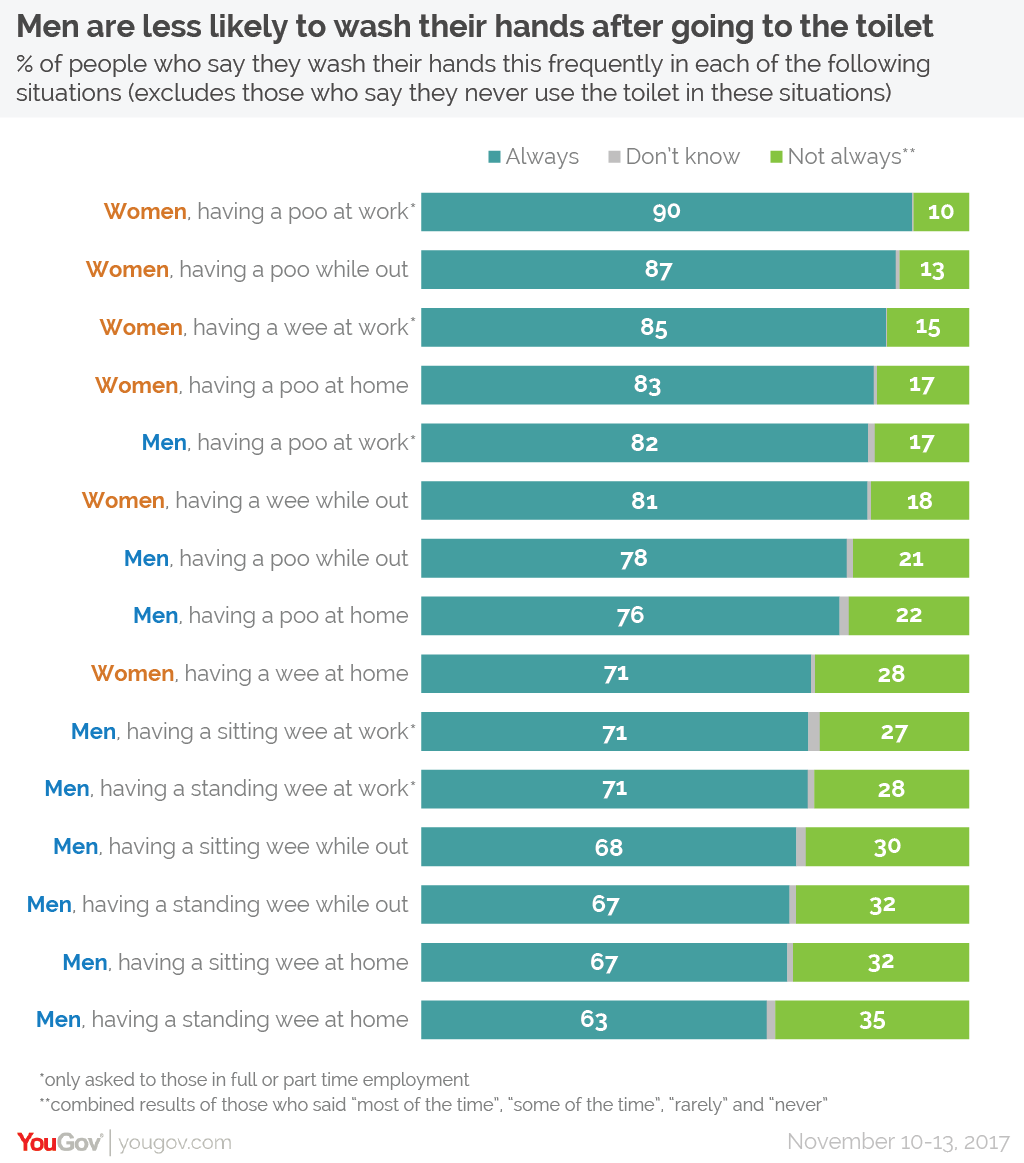
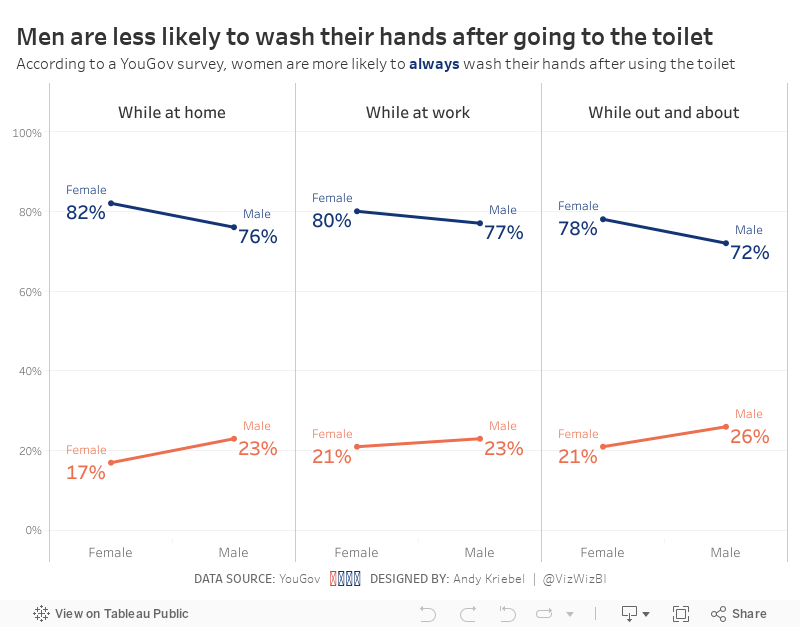
Makeover Monday: Women are more likely to always wash their hands after using the toilet

Anyway, onto the viz to critique:
What works well?
- The design of the responses as a stacked bar chart is easy to understand.
- The responses are ordered from highest to lowest.
- Women and men are assigned difference colors in the text
- Good title and subtitles
- Colors are easy enough to distinguish
What could be improved?
- Comparisons between women and men in the same categories are hard to make
- Maybe there could be an easier way to distinguish between poo and pee
My Goals
- Do something quick (like 10 minutes); I'm late for MM for the first time ever, but it's ok because I'm on holiday with my Dad and Brother.
- Make the comparisons easier
- Use colors that are a bit easier to associate to the men and women categories
October 15, 2018
Makeover Monday: The Under-representation of Women in the House of Representatives


What works well?
- It's simple and easy to understand.
- Nice and clean; there's no unnecessary decoration
- Using colors that represent the parties
- Using a line chart to represent change over time
- Labeling the end point makes us aware of the current situation
What could be improved?
- The stepped lines are necessary.
- The ratio of the chart looks strange to me.
- The title could be more impactful.
- Adding a y-axis would add context.
What I did
- Focus on the % of women and men in each party
- Use the party colors, but still be able to distinguish men and women
- Use a line to break up the area chart
- Use an impactful title and subtitle
- Use a viz in tooltip to show BANs
March 5, 2018
Makeover Monday: How good are policymakers at estimating indicators related to girls and women?
I ended up skimming through parts of the main report to get a better idea as to what the survey is about and any interesting findings they might describe.
In the end, there were major themes:
- Policymakers are really out of touch with the issues facing girls and women in the five countries in the study.
- Policymakers "think" they know what's going on.
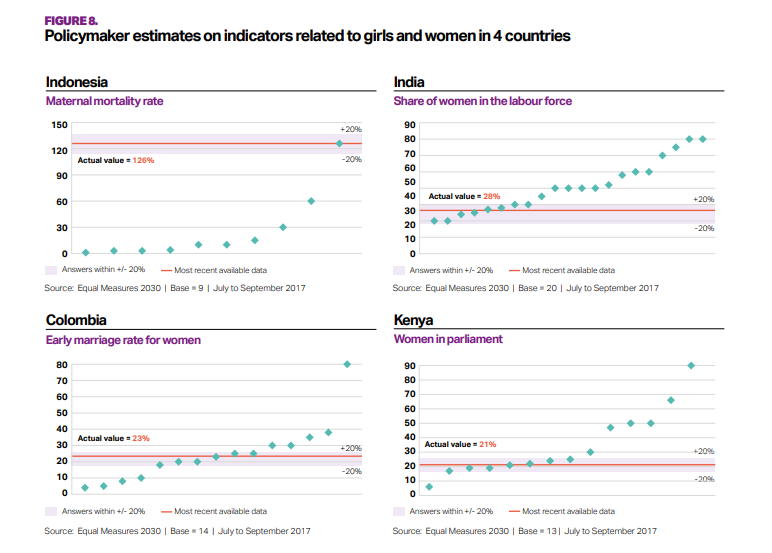
What works well?
- The bands for +/- 20% from the actuals helps give context to the estimates from policymakers.
- The country titles and subtitles for the topic make is easy to know what each chart is about.
What could be improved?
- What do the green diamonds mean? Apparently they are policymaker estimates, but there's no indication of that in the dashboard.
- Why are these topics picked for these countries?
- Why is Senegal excluded?
- A more impactful and descriptive title would help.
- It's unnecessary to include the source and legend with each chart.
My Goals
- Try to understand the data; easier said than done
- Understand the spread of each topic within each country
- Show ALL responses
- Allow the user to filter and drill in to the topic they are interested in.
- Stick to the overall style guidelines from Equal Measures 2030
- Include BANs for the number of policymakers that estimated within +/- 20% of the actual values
January 8, 2018
Makeover Monday: Using Gauges in Highcharts to Understand Characteristic Preferences In Romantic Partners
Click here for the interactive version, which doesn't really do much other than animate the filling of the gauges.






