May 19, 2021
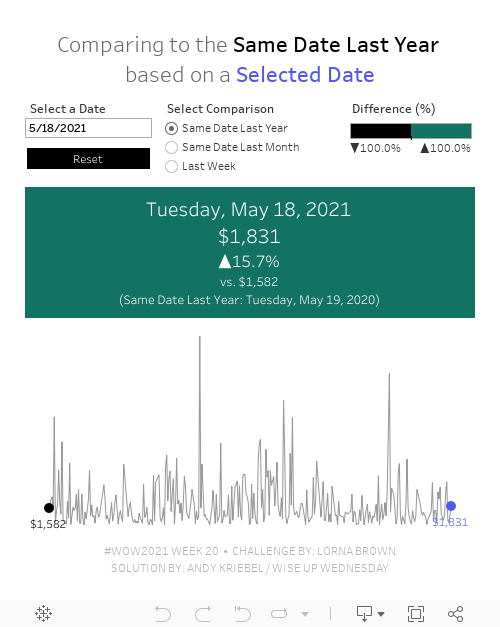
#WOW2021 Week 20: Can you compare Same Day to a Selected Date?

Wow! This workout will really test your knowledge of table calcs. The challenge comes from Lorna; view the requirements here.
The main purpose of this challenge is to get familiar with dates and parameters. Fortunately, every Wednesday I host what we call "Wise Up Wednesday" during lunch for my colleagues at The Information Lab and The Data School. We needed all of our brain power for this one. For us, the toughest part wasn't writing the calculations themselves. Rather, it was the logic required for the calculations.
From Lorna:
What if you want to compare a date you choose to the same DAY. For example, Tuesday 18th May 2021, would compare to Tuesday 19th May 2020 for the previous year, and Tuesday 20th April for the previous month. The reason you would want to do this is to compare the Tuesday to Tuesday.
This is where the logic gets tricky. We approached the solution by taking one version at a time, meaning we started by creating the calcs for the same day last year before we went onto the other two scenarios.
We got the in the end. I'd recommend building everything as a table, then change it into a chart later. It's much easier to follow what you calcs are doing.
Good luck! Here's our solution:
July 12, 2016
Tableau Tip Tuesday: How to Use Actions To "Reset" a Chart to the Most Recent Date

This week’s tip is based on a tip written by Richie Fanti back in 2013 when he worked for me at Facebook. In essence this tip shows you how to use a dashboard action to “reset” a chart to show the most recent date after you clear the action. It’s a really useful technique when you want the default view to be the most recent date but you want the user to be able to see details for a specific date when they click on it.
If you have any questions, leave a comment below.






