October 19, 2016
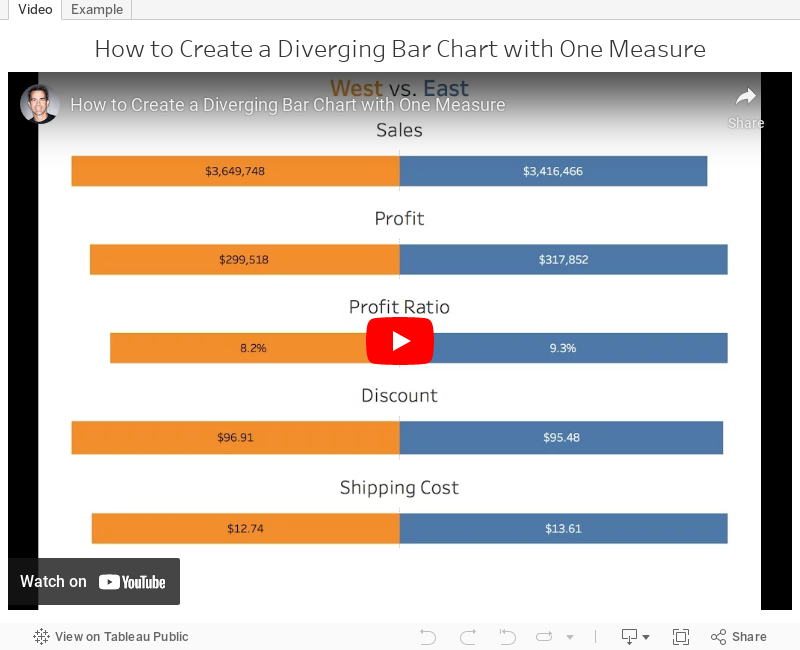
Tableau Tip Tuesday: How to Create a Diverging Bar Chart with One Measure

With a cheeky use of the INDEX table calculation, this was quite straightforward. In the video below, you'll see that the middle of the charts aren't lined up. I fixed this by using the INDEX calc again. You can download the workbook to see how I got it to work.
July 25, 2016
Makeover Monday: Bermuda Population Growth

Following on from last week’s discussion about Makeover Monday and what might be keeping people from participating, Andy and I are committing ourselves to keeping our visualisations simple and quick. The data set provided this week has A LOT of census information included, but I focused on the data from the original post. Here’s the original from Rhiannon Fox, a graphic designed based in Bermuda.

I spoke to Rhiannon about her work and I’m hoping she becomes part of our teaching curriculum at the Data School. She’s very excited to see what everyone comes up with.
What works well?
- I love the colors
- Simple, small multiples layout
- Great fonts
- Great labeling
- Consistent use of shapes for the unit charts
- Neatly organized in a Z-pattern from oldest to most recent
- Population growth is easy to see
What doesn’t work well?
- A unit chart sacrifices accuracy for engagement.
- The overall pattern is harder to see than it needs to be.
- It’s too difficult to compare females from year to year.
Given what I like and don’t like, and sticking to the one hour time limit, I decided to go with a diverging bar chart, also known as a back-to-back bar chart or a bikini chart or a population pyramid.

January 26, 2016
Tableau Tip Tuesday: How to Create Diverging Bar Charts

UPDATE: Some followers have let me know that they've heard these charts called tornado charts or butterfly charts. Basically, the consensus is that this type of chart doesn't have a name. That's ok though!
For this week's tip, I show you how to make diverging bar chart or bikini charts or whatever they are called.
January 18, 2016
Makeover Monday: Are Consumers Bored With Technology?


This chart is so bad, it's tough to know where to start. Let's start with what works well:
- There's a clear title and subtitle that tell us what the chart is about.
- While I don't use icons often, their use of icons for each type of technology might aid some people in understanding, though I suspect they add them more for decoration.
- There's a clear order to the donuts, from highest to lowest based on the 2016 purchase rate.
- The font is consistent throughout the graph.
- They fit a lot of information in a small space.
Let's now consider what could be improved:
- The use of donut charts makes comparing the technologies more difficult than necessary.
- They used sized bubbles for negatives and positives. Really bad idea because this might make people think -1% is the same as +1%.
- Using bubbles to represent 2015 makes comparing 2015 values really difficult as you have to do the math in your head. Quick, which technology ranks third for 2015?
- It's harder than necessary to compare 2015 to 2016 for each technology.
- The red/green bubbles will be challenging for the red/green colour-blind folks.
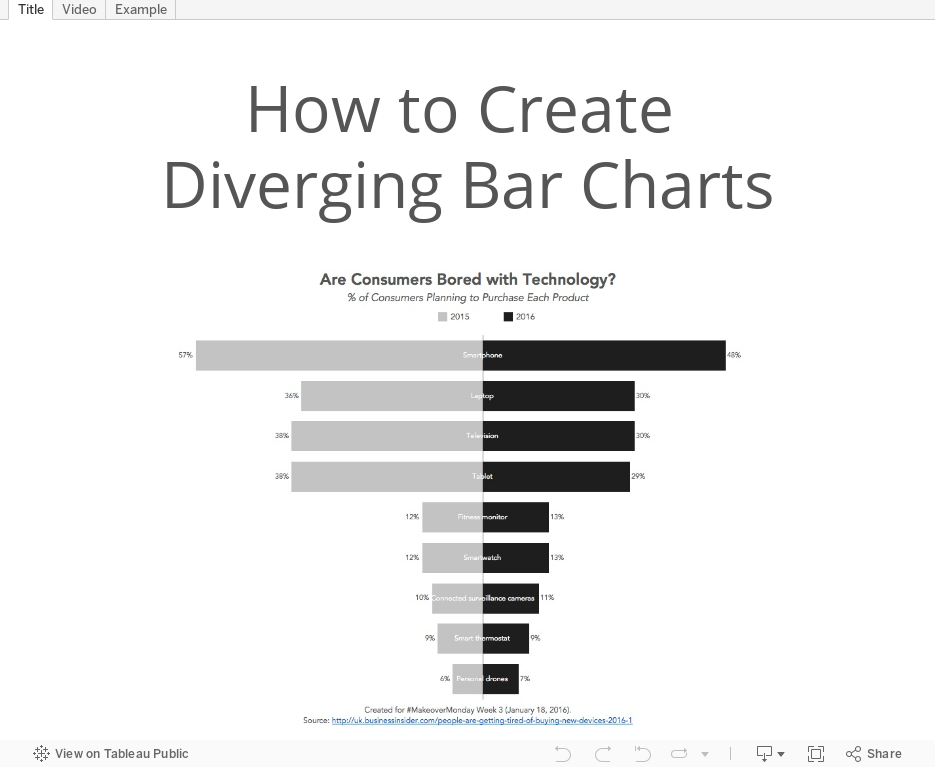
With these problems in consideration, I've created this alternative version. This took only about 15 minutes to create and 15 minutes to tidy up and organize. Click on the image to view the interactive version and to download the workbook.






